
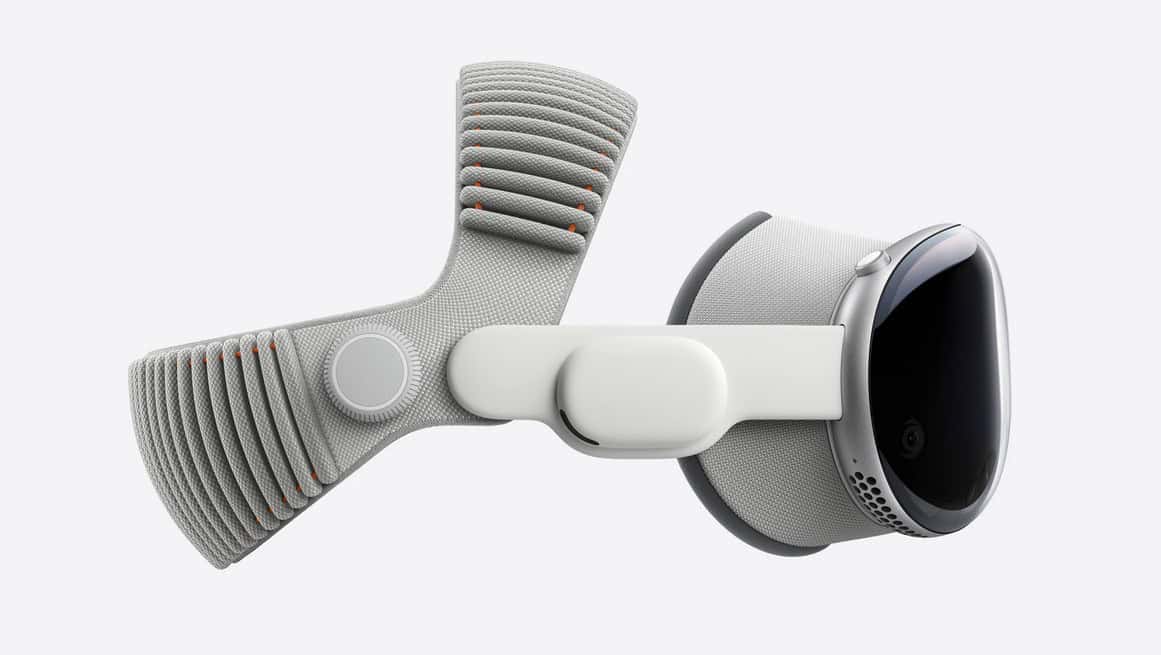
Apple’s new two‑strap knit design ships with the M5 Vision Pro and is sold separately for $99. Here’s why it matters — and who should upgrade.
Apple quietly solved a very loud complaint about Vision Pro: pressure on the cheeks and forehead during long sessions. The new Dual Knit Band splits support across two knit straps and adds a dial for micro‑adjustment, so weight is balanced toward the top and back of your head rather than bearing down on your face. It ships with the refreshed M5 model and is also offered as a standalone accessory.
If you’ve been following today’s announcements, you know Apple also pushed a broader Vision Pro refresh — faster rendering, longer battery life, and a bigger AI push with the M5 chip — which makes comfort upgrades more than cosmetic. See our coverage of the headset update and chip details for the full picture: Vision Pro gets the M5 chip and a comfier Dual Knit Band, M5 vs M4: key changes.
Don’t miss the best of The Mac Observer
Set us as a preferred source and our Apple reporting ranks higher in your Google Search results and Discover feed — one tap, no account changes.
What’s actually new
- Two knit straps, not one. The upper strap stabilizes the visor; the lower strap carries weight. You tune each independently via the integrated dial.
- Better load path. The band’s geometry shifts mass off the cheeks and nose bridge and into the crown and occipital area, reducing hotspots in 30–90‑minute blocks.
- Quick‑detach lugs. Swapping bands is now a two‑second move, not a mini teardown.
- Back‑compatibility. It works on the original model too, so early adopters aren’t left out. Details in our comparison: Vision Pro (M5) vs Original.
Price and availability
Apple lists the Dual Knit Band at $99. It’s included with the new M5 headset and sold separately for anyone sticking with the first‑gen unit. We outline the accessory lineup — including Logitech’s new Muse stylus — here: Two new Vision Pro accessories: Logitech Muse and Dual Knit Band.
How it feels in longer sessions
The Dual Knit Band’s main win is pressure management. With the lower strap set to “carry,” cheeks stop taking the brunt of the load, especially if you’re reviewing clips in Final Cut Pro for visionOS or juggling windows across spatial desktops.
The upper strap handles stability — nods and quick turns don’t loosen your seal. In practice, we’ve found you can run longer before needing to re‑seat the headset, which pairs nicely with the M5 model’s efficiency gains and visionOS 26 improvements. Catch up on the platform updates here: visionOS 26 features and launch timing and the latest maintenance seed: visionOS 26.1 public beta 3.
Setup tips that actually help
- Start light. Tighten the lower strap until cheek pressure disappears, then add a click or two more for security.
- Lock stability on top. Use the upper strap to stop micro‑wobble when you look down and up.
- Do a 10‑minute shakedown. If hotspots appear, back off the lower strap one click and tighten the upper one.
- Hair volume matters. If you were between sizes on the Solo Knit, consider sizing up. The extra upper strap eats a bit of slack.
Where it fits in the lineup
- Solo Knit (included with the first‑gen): Easy and sleek, but can feel front‑heavy beyond 30 minutes.
- Dual Loop: Better balance thanks to two straps, but the manual Velcro tuning can be fiddly.
- Dual Knit (new): The most balanced stock option — two knit straps plus a tension dial make fine‑tuning trivial. For many users, this is the first band that truly enables multi‑hour work blocks.
Why Apple did this now
Comfort isn’t a side quest; it’s table stakes if Apple wants Vision Pro to be a daily tool for editing, coding, and collaboration. The M5 bump and rendering tweaks reduce nausea‑inducing hiccups, while input options expand — PS VR2 Sense controller support is slated for November — so a band that keeps the headset planted is essential. Read more: PS VR2 controller support is coming to Vision Pro.
Should you upgrade if you own the first‑gen band?
If you regularly hit 45‑minute sessions and notice face fatigue, yes — the $99 fix is far cheaper than jumping to a halo strap from third parties, and it keeps the system svelte. If you mostly demo apps or watch short videos, your existing band is fine.
Bottom line
The Dual Knit Band isn’t flashy, but it meaningfully changes day‑two comfort. Paired with the M5 model’s performance and battery gains, it’s the default band we’d recommend for anyone trying to make Vision Pro an all‑day machine.
More reading: Vision Pro M5 + Dual Knit Band, M5 vs M4, Vision Pro (M5) vs Original, New accessories overview.



Discussion