

Effective time management is essential in a distracted world. The iPhone offers a powerful platform for dedicated Apple users to boost organization and focus. Crucially, the right mobile app transforms chaotic projects and personal goals. Investing in quality time management tools is the crucial first step toward a productive, less stressful daily life. These tools streamline task capture and help you achieve mental clarity.
Table of contents
Essential iOS Tools for Boosting Productivity
Effective time management needs prioritization, scheduling, and tracking. It must be more than a simple list. Therefore, iPhone apps provide tailored organizational solutions. These include task managers and focus timers. Selecting the right tools reduces cognitive load immediately. You then focus energy on important tasks. For broader help, explore the best iPhone apps for productivity that complement your schedule.
1. Todoist: Master Your Daily Task Flow
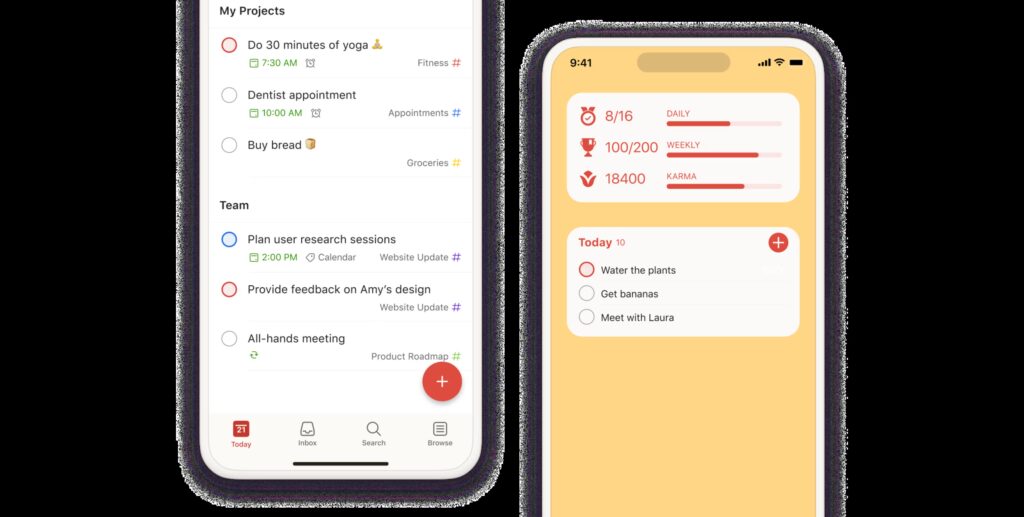
Todoist stands out among task managers. It is robust and widely acclaimed for iPhone users. Its strength lies in its quick task capture feature. Users type descriptive phrases using natural language input. For example, the app schedules “finish report due Tuesday at 3pm” automatically. This feature speeds up the process significantly. Todoist excels at personal organization and team collaboration. It offers subtasks, projects, and customizable priority levels. You will always focus on the next important item.
Don’t miss the best of The Mac Observer
Set us as a preferred source and our Apple reporting ranks higher in your Google Search results and Discover feed — one tap, no account changes.
2. Things 3: Organize Complex Projects with Simplicity

Things 3 is exclusive to Apple devices. It offers a beautifully designed and uncluttered interface. This makes complex project management intuitive. The powerful structure organizes tasks into projects and areas of responsibility. It maintains a native iOS aesthetic throughout. The ‘Today’ view intelligently highlights what needs your attention. It pulls from recurring and scheduled tasks. Consequently, its frictionless design handles major long term goals. Furthermore, it remains simple enough for daily checklists.
3. TickTick: Combining Tasks and Focus Timers

TickTick provides a highly effective solution for users. It unifies task management and concentration efforts. This app integrates a comprehensive to do list manager. It features a built in calendar view and a Pomodoro timer. The Pomodoro timer allows users to apply focus sessions directly against tasks. This encourages deep work and minimizes distraction. This all in one functionality is exceptional. It aids students and professionals aiming for consistent, distraction free work blocks.
4. Fantastical: The Power of Natural Language Scheduling

Fantastical elevates the scheduling experience immediately. It combines a powerful calendar with outstanding natural language parsing. You can create events simply by typing phrases. For example, “team meeting tomorrow at 10am for an hour” works perfectly. A key feature is Calendar Sets. This allows you to filter and view only relevant calendars. You can easily hide personal events during work hours. This ability to control visual clutter is vital. It prevents scheduling overload and maintains focus.
5. Toggl Track: Precise Time Monitoring

True time management requires accurate time knowledge. Toggl Track is built precisely for this purpose. It is a dedicated time tracking application. You easily start and stop timers across different projects. This happens with a single tap on your iPhone. The app provides detailed reports and analytics. You get clear insights into how much time you spend on activities. Monitoring time is also useful for other organization. For instance, understand financial outgoings when using the best iPhone apps for budgeting.
FAQ
Yes, you can use Apple Reminders. It evolved into a capable task manager. Features include tags, Smart Lists, and collaboration. It is a strong, free option. Use it if you prefer strictly native applications.
Many popular task managers include focus tools. TickTick, for example, features the Pomodoro technique. Dedicated focus apps offer extra discipline, however. Alternatively, take time to make apps clear on iPhone. This blocks distracting applications during key work periods.
Most high quality apps offer a robust free tier. This includes core features. Advanced functionality requires a premium subscription, however. This usually covers deep analytics, collaboration tools, and recurring tasks.
Optimizing Your Schedule for Success
Choosing your time management app is a personal decision. It depends on whether you prioritize simplicity, task complexity, or precise time tracking. Implement one of these top tier applications today. You move past simple listing tasks. Instead, you start actively structuring your days for maximum effectiveness. These powerful solutions ensure your iPhone acts as an organizational assistant, not a distraction source. Consequently, the utility of these tools quickly makes them indispensable, joining the ranks of the apps for iPhone I cannot live without.


Discussion