

Many Mac users need to scan documents and photos. You might own an HP printer or a dedicated scanner. You need the best HP scanner software for Mac. Mac users have strong options available. These include HP’s own apps and built-in macOS tools. Third-party applications also offer versatility. Understanding each tool helps you select the right solution. This selection is key for your workflow.
Table of contents
Optimize Your Scanning Experience on Mac With the Best Software
1. HP Easy Scan
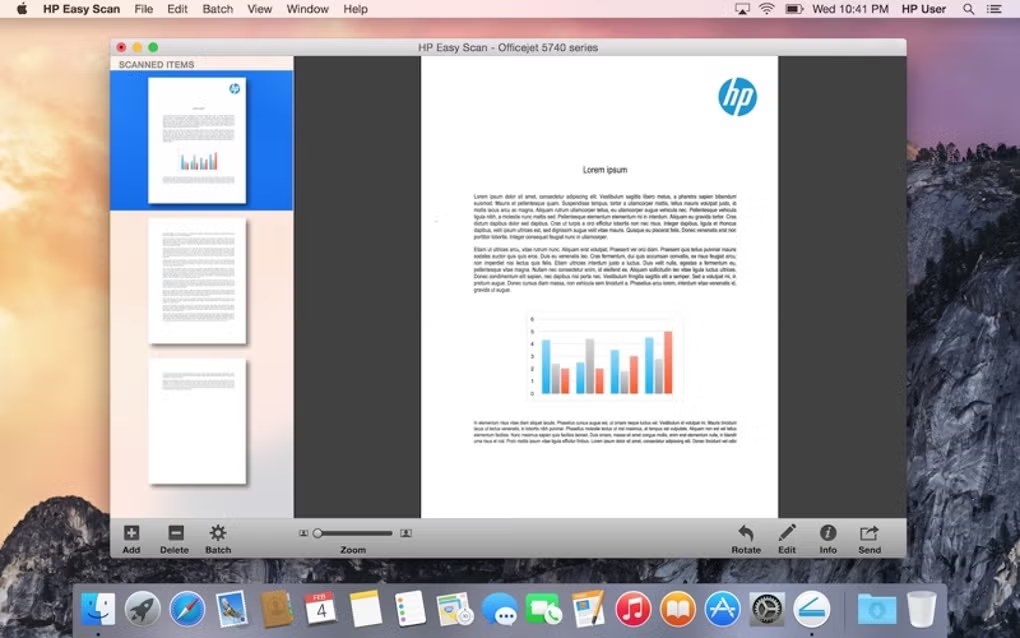
HP Easy Scan is HP’s dedicated utility. It is very user-friendly for macOS. It offers a simple, streamlined interface. This is perfect for everyday scanning. The app includes essential functions. These functions are cropping and resolution adjustment. It saves scans in popular formats. These include PDF and JPEG. Easy Scan is the best choice for simple use. It lacks complex settings. This is useful for older HP models. These models may not support newer apps.
2. HP App (formerly HP Smart App)

The HP App replaced the HP Smart App. It serves as an all-in-one management solution. It handles your printer and scanner. HP recommends this app for most current devices. It manages scanning and includes advanced features. For example, it supports automatic document feeding (ADF). It also offers simple editing. Furthermore, the app manages printing and supplies. It even provides tech support and mobile fax. Thus, the HP App is ideal for users. They control all HP functions from one dashboard. This works on Mac, iPhone, or iPad.
Don’t miss the best of The Mac Observer
Set us as a preferred source and our Apple reporting ranks higher in your Google Search results and Discover feed — one tap, no account changes.
3. Preview App

The macOS built-in Preview app is a fast solution. It requires no installation. It is a powerful option. Set up your HP scanner with AirPrint or basic drivers. Then, access its scanning directly through Preview. Open Preview first. Then, select File > Import from Scanner. Choose your HP device next. This utility uses the native Image Capture protocol. People often overlook this tool. However, it scans quickly into a standard macOS app. This allows immediate review and basic annotation. Also, learn about how to scan images and documents in macOS Ventura. This method works for other operating systems.
4. VueScan

VueScan is a popular third-party scanning application. People praise its vast compatibility. They also love its advanced features. It supports a huge range of scanners. This includes many older HP models. HP often stops updating drivers for these. This application is an excellent alternative. It suits professionals and enthusiasts well. It offers high-level controls. These cover color correction and batch scanning. It also handles film and slide scanning. It even brings old hardware back to life. Its ability to bypass drivers is a major benefit. This ensures long-term usability. If you need alternative software for Neat Scanner for Mac, VueScan is a versatile option.
5. ExactScan

ExactScan is another powerful third-party choice. It strongly focuses on document management. It also includes optical character recognition (OCR). This robust tool converts physical documents. It makes them searchable, digital files. Business or administrative users process many documents. For them, ExactScan significantly boosts productivity. Features like automatic de-skewing help. Batch scanning is also very helpful. It supports many HP devices. People consider it a top-tier option. It is great among Mac utility software for serious document processing.
FAQ
No, you do not need separate software. Your HP device must be AirPrint-compatible. Then use built-in macOS tools. The Preview app or Image Capture work well. You avoid installing proprietary applications or drivers. This is fine for basic scanning.
You can download the official HP App. The older HP Easy Scan is also available. Find it on the Apple App Store. HP’s official support website also hosts the file. Search for your specific printer model there.
Yes, free options exist. The Preview app and Image Capture are free. They are built-in macOS tools. They provide excellent basic scanning. This works for most connected HP devices.
Choosing the Best Scanning Solution for Your Mac
Selecting the right HP software depends on your specific needs. The HP App is the best choice for a seamless, all-in-one experience. This applies to modern devices. Alternatively, the Preview App offers an elegant native solution. Use it for quick, simple scans. You do not install any new software. However, you might need specialized control or high-end features.
You may also support an older model. In these cases, reliable third-party applications provide power. They offer the necessary flexibility. Indeed, these professional tools are essential. They ensure optimal productivity. They compare to finding the right Canon scanning software for Mac for users.


Discussion