

It happens to everyone: you set your iPhone down somewhere at home, and now it’s vanished between the couch cushions, in your bag, or maybe on silent mode. The good news is that Apple makes it easy to track down a misplaced iPhone, even if it’s muted. Here’s how to find your iPhone at home quickly and without stress.
Table of contents
Before You Start
- Make sure Find My iPhone is enabled (Settings › [your name] › Find My › Find My iPhone).
- Keep another Apple device (like an iPad or Mac) handy, or access iCloud.com.
- Ensure your iPhone is signed into iCloud.
Ways to Find Your iPhone at Home
1. Use the Find My App
- Open the Find My app on another Apple device.
- Tap Devices and select your iPhone.
- Tap Play Sound, your iPhone will emit a loud chime, even if on silent.
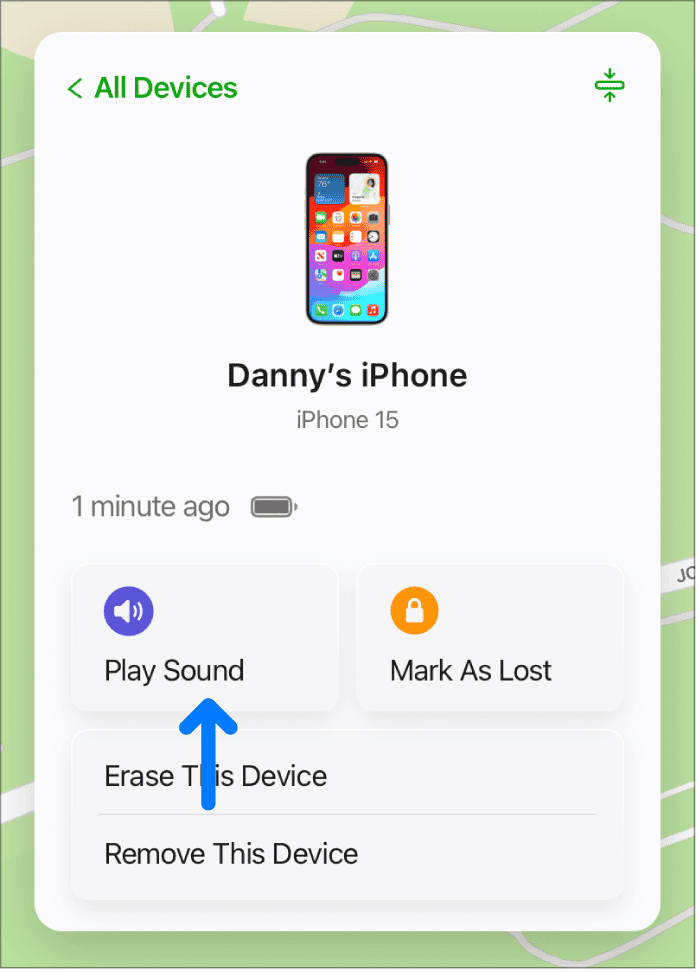
- Follow the sound to locate your device.

2. Use iCloud.com
- On a computer, go to iCloud.com and sign in.
- Click Find iPhone.
- Select your iPhone from the list and click Play Sound.

For more details, read our separate guide on how to use Find My via iCloud to locate your device.
3. Ask Siri to Help
If your iPhone is nearby and “Hey Siri” is enabled, say:
Don’t miss the best of The Mac Observer
Set us as a preferred source and our Apple reporting ranks higher in your Google Search results and Discover feed — one tap, no account changes.
- “Hey Siri, where are you?”
- Siri will respond with a sound or voice.
4. Use Apple Watch (If You Have One)
- Swipe up on your Apple Watch to open Control Center.
- Tap the Ping iPhone button.

- Your iPhone will make a sound, even if silent.

5. Call Your iPhone
- Use a friend or family member’s phone.
- Even if your iPhone is on silent, the vibration can help you locate it.
6. Retrace Your Steps
Sometimes the simple methods work best, check usual spots like the couch, kitchen counters, under pillows, or near charging stations.
You might also want to check out our guide on how to find your iPhone if it’s turned off or dead.
Tips for Success
- Enable Find My: Without it, locating your iPhone is much harder.
- Turn on “Send Last Location”: This helps if your phone dies before you find it.
- Check Silent Mode: Use Play Sound to override silent or vibrate.
- Use Family Sharing: Family members can help ping your iPhone through their devices.
FAQs
No. You can only see its last known location before it powered down.
You can still use a web browser on any computer at iCloud.com.
No direct flash option exists, but the sound works even if silent.
Summary
- Use Find My app or iCloud.com to play a sound.
- Ask Siri or use your Apple Watch to ping it.
- Call your phone or check usual spots around your home.
- Enable Find My and Send Last Location for future peace of mind.
Conclusion
Misplacing your iPhone at home can be frustrating, but with Find My, Siri, and even your Apple Watch, you can track it down in seconds. Set up Find My in advance and practice using these features, so the next time your iPhone hides in the couch cushions, you’ll know exactly how to find it.



Discussion