
Siri on HomePod can check your Calendar thanks to the HomePod 11.4 software update. You’ll have to enable Personal Requests first, which takes just a few steps. Here’s how to do it.
First you need to make sure your HomePod updated to HomePod 11.4. I walk you through checking your HomePod software version and updating your HomePod software in a couple other tips I’ve written.
[Here’s How to Check for HomePod Software Updates]
[Here’s How to Update Your HomePod Software]
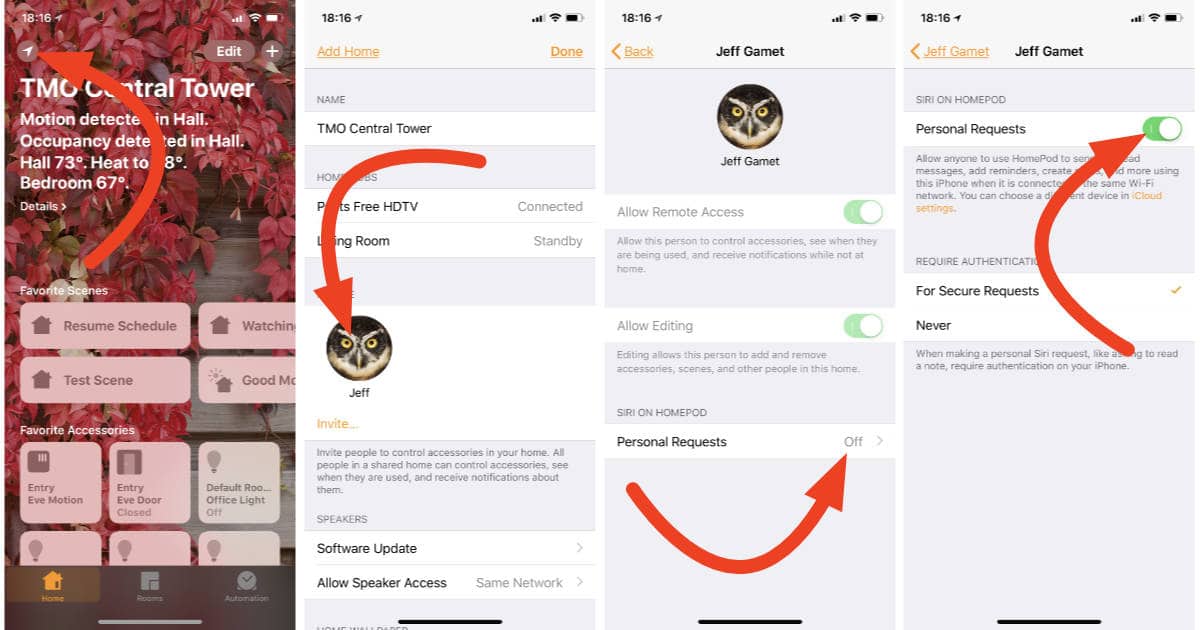
Once you know your HomePod software version is 11.4 you can enable Personal Requests. Here’s how:
- Launch the Home app on your iPhone or iPad
- Tap the Location icon in the upper left corner
- Tap your name in the People section
- Tap Personal Requests
- Turn on Personal Requests
Now you can say things like, “Hey Siri, what’s my next appointment,” and your HomePod can actually tell you.
Don’t miss the best of The Mac Observer
Set us as a preferred source and our Apple reporting ranks higher in your Google Search results and Discover feed — one tap, no account changes.




Discussion