

Losing your iPhone can send you into panic mode, especially if it’s powered off. But here’s the good news: with Apple’s Find My network, your iPhone can still be located even when it’s turned off, at least if you have the right model and settings turned on. Let’s break down how it actually works, what you need to enable beforehand, and what to do if your phone ever goes missing.
Table of contents
How Find My iPhone Works

Apple’s Find My feature uses a secure, anonymous network of millions of Apple devices that help locate your lost phone. When an iPhone is lost, other nearby Apple devices can detect its Bluetooth signal and quietly send its location to iCloud.
That’s how you can open the Find My app on another Apple device (or log into iCloud.com) and see where your phone was last detected, even if it’s not connected to Wi-Fi or cellular data.
Don’t miss the best of The Mac Observer
Set us as a preferred source and our Apple reporting ranks higher in your Google Search results and Discover feed — one tap, no account changes.
This all happens in the background, with encryption to keep your data private.
Finding an iPhone That’s Turned Off
If your iPhone is completely powered off, there’s still hope. Apple’s Find My network keeps track of your phone’s last known location for up to seven days. Newer iPhones (iPhone 11 and later) take this a step further with Ultra Wideband chips that let you find them even when they’re off or have a dead battery.
Here’s the key: your iPhone must have Find My iPhone, Find My Network, and Send Last Location turned on in advance. Once those are active, the phone will automatically share its last location before powering down.
When you try to find it later, you’ll see “iPhone Findable After Power Off” under the power slider, that means offline finding is active.
How to Turn On Find My Network
Before your phone goes missing, double-check that these settings are on:
- Open Settings.
- Tap your name at the top, then select Find My.

- Turn on Find My iPhone, Find My Network, and Send Last Location.
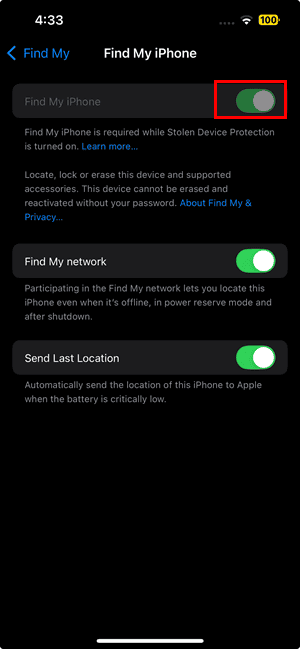


These settings make your iPhone traceable even when it’s offline, off, or low on battery.
How to Locate a Lost or Powered-Off iPhone
Once everything’s set up, here’s how to track your device if it ever disappears:
Using Another Apple Device
- Open the Find My app.
- Go to the Devices tab.
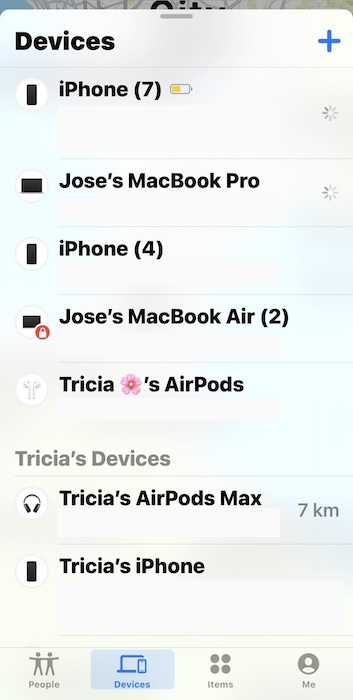
- Tap your missing iPhone.
- You’ll see its last known location on the map.
- You can make it play a sound, get directions to its location, mark it as lost, or even erase it if you believe it’s stolen.

Using iCloud.com
If you don’t have another Apple device, visit icloud.com/find and sign in with your Apple ID.
You’ll see the same options: view the location, mark it as lost, or erase the phone remotely.
When Find My Can’t Locate Your iPhone
If Find My says “No location found” or “Offline,” there are a few reasons that might happen:
- The phone hasn’t connected to Apple’s network in over seven days.
- It’s an older iPhone model without the Ultra Wideband chip.
- Location Services are turned off or malfunctioning.
- It’s in a region where Find My isn’t supported.
Even then, Find My will still display the last known location, which can give you a starting point.
What Lost Mode Does
If you can’t recover your iPhone right away, turn on Lost Mode. This locks your phone with a passcode and suspends Apple Pay so no one can use your cards or passes. You can also add a message with a contact number so whoever finds your phone can reach you.
Just open Find My, tap your missing device, scroll down, and select Mark as Lost.
The Bottom Line
Yes, Find My iPhone does work when your phone is off, but only if you’ve turned on Find My Network and are using a newer model that supports offline tracking. The feature can’t perform miracles, but it’s one of the most reliable safety nets for finding lost Apple devices.
Think of it as digital insurance: take five minutes to turn it on now, and your future self might thank you later.


Discussion