

Change tracking software is a key tool for Mac users. It offers a complete digital record of all modifications. This includes ticket resolutions and time spent on projects. You may manage complex team projects or pursue personal efficiency. These applications provide crucial activity visibility. Consequently, professionals and large organizations need this record. Visibility ensures compliance and accurate billing. Furthermore, the right tool creates a transparent, accountable system. It guarantees every action is properly documented.
Table of contents
Monitoring Productivity and Digital Asset Changes on macOS
1. Pages

Pages is Apple’s native word processor. It features a powerful, built-in collaboration tool. Apple calls this feature Track Changes. When you enable it, the software records every user edit. A dedicated review toolbar then appears. This toolbar gives you control over the markup view. Additionally, you can easily pause tracking if needed.
Editors use the Comments & Changes sidebar. Here they view an organized list of all modifications. The sidebar clearly shows comments and author details. This is essential for publishing and legal teams. It ensures a complete audit trail of all revisions. Users can manually accept or reject proposed changes. This confirms the document only includes approved edits. You can also secure private data by learning how to Block Cross Site Tracking.
Don’t miss the best of The Mac Observer
Set us as a preferred source and our Apple reporting ranks higher in your Google Search results and Discover feed — one tap, no account changes.
2. Toggl Track
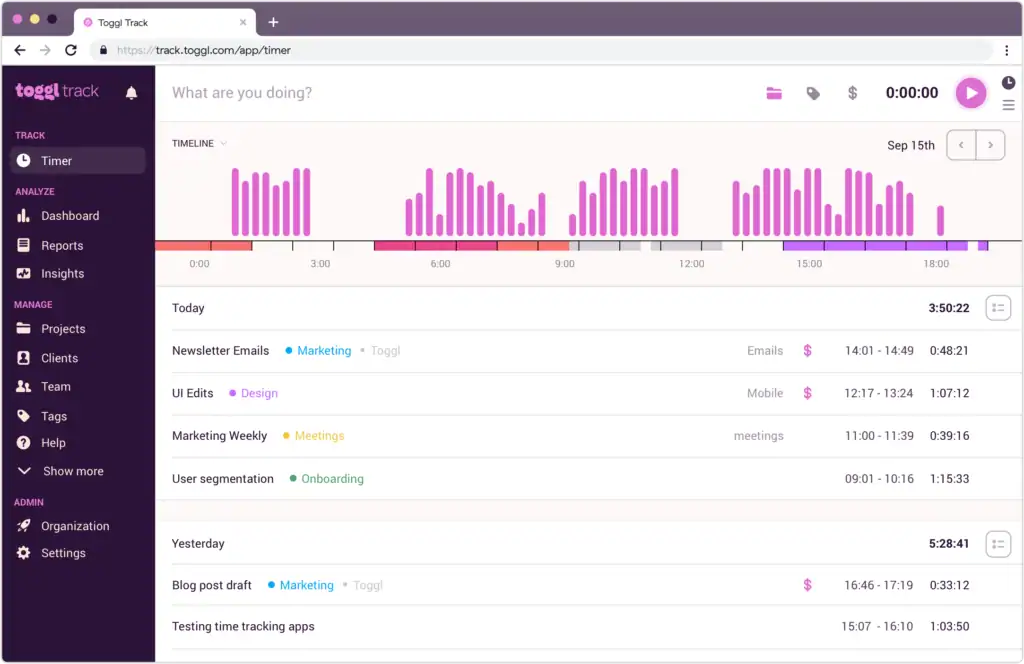
Toggl Track is a popular Mac time tracking application. It integrates into the desktop environment with ease. It provides passive tracking by recording time with one click. This monitors time spent on all your projects. A key component is the Timeline feature. It records every website or app viewed over ten seconds. This establishes a full digital audit trail of your workday.
This application reduces the need for manual tracking. The Autotracker suggests time entries automatically. These suggestions are based on the software you use. Moreover, Idle Detection alerts you during inactivity. You categorize this time when you return to your Mac. This functionality delivers detailed, accurate billing data. Consequently, it helps users review and maintain your Mac workflow.
3. RescueTime

RescueTime is an automated productivity utility. It operates securely in the background on your Mac. It records time spent across all applications and websites. It categorizes activity as productive or distracting. This provides a detailed Productivity Score. The reports illustrate how your focus trends over time.
Its main benefit is improving user habits. It converts raw usage statistics into smart insights. Users set personalized daily goals for time use. They may receive real time custom alerts. These notifications help maintain focused work. Furthermore, the Focus Sessions feature blocks distractions. This enforces concentration and provides a full picture of productive hours.
4. Wrike

Wrike is a broad work management platform. It offers a native desktop application for Mac. Although focused on project management, it tracks changes well. It reports all task and project progress in real time. Project managers immediately see workload shifts. They also monitor task status updates. Therefore, the entire project health is visible.
The platform includes integrated time tracking. This logs hours against specific assignments. The feature allows for precise resource allocation monitoring. Wrike excels at centralizing change tracking across large projects. This helps teams identify issues before they cause delays. It also assists IT teams responsible for monitoring the health of their core systems.
5. Issuetrak

Issuetrak is a flexible solution for issue and ticket management. It is a great change tracking hub for service teams. It simplifies help desk and work order systems. It automatically logs every change to an issue’s status. It tracks assignee and resolution details, too. This process creates a detailed, indisputable audit trail. This trail is essential for compliance.
Additionally, the platform includes Asset Management. This module supports automatic device tracking. It works for both PC and Mac devices on a network. Therefore, changes to physical assets are logged instantly. Robust workflow automation triggers alerts easily. It uses defined criteria for status updates. This ensures rapid response to any change event.
FAQ
No. RescueTime prioritizes the user’s privacy. It is a personal productivity tool. It provides data and insights to help manage your own time.
Yes. Pages’ Track Changes feature runs locally on your Mac. Changes are tracked and saved even offline. They sync later when you connect again.
Toggl Track is often the top choice. It features one-click tracking and detailed reports. You can easily assign billable rates to projects.
Achieving Accountability with Change Tracking
Implementing one of these applications greatly improves workflows. They provide clear, measurable data on activity and progress. You can use Pages for revision control. Alternatively, you can deploy Issuetrak for issue management. A dedicated Mac solution exists for every need. These applications simplify the job of documenting effort. Consequently, users can achieve total accountability. Learn more about Time Tracking on Mac to optimize your daily efficiency.


Discussion