

Apple Watch includes an Airplane Mode feature that quickly disables all wireless connections, such as Wi-Fi, Bluetooth, and cellular. It’s useful when flying or when you need to save battery. Airplane Mode can be turned on directly from the watch or through the paired iPhone. Here’s how you can enable it using every available method on different Apple Watch models.
Table of contents
Ways to Turn On Airplane Mode on Apple Watch
There are a few simple ways to activate Airplane Mode. You can turn it on from the Control Center, use the Settings app on the watch, or sync it with the iPhone’s Airplane Mode. Each method depends on how the watch is set up and connected.
1. Turn On Airplane Mode from Control Center
- Swipe up from the bottom of the watch face to open the Control Center.
- Look for the Airplane icon.
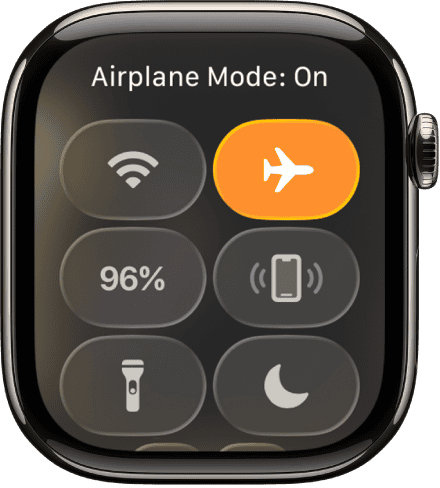
- Tap it once. The icon turns orange, meaning Airplane Mode is active.
- All wireless connections, including cellular and Wi-Fi, will turn off.

If you want to learn more about navigation and accessing menus, see how to use the Apple Watch.
Don’t miss the best of The Mac Observer
Set us as a preferred source and our Apple reporting ranks higher in your Google Search results and Discover feed — one tap, no account changes.
2. Turn On Airplane Mode from Settings
- Press the Digital Crown to go to the Home Screen.
- Tap the Settings app.
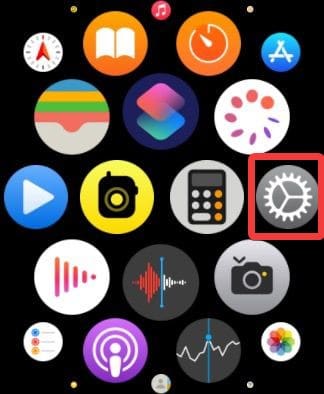
- Scroll down and select Airplane Mode.
- Tap the toggle to turn it on.

To locate the Settings app easily, check this guide on going to Settings on Apple Watch.
3. Use iPhone to Enable Airplane Mode on Apple Watch
- Open the Watch app on your iPhone.
- Tap My Watch.
- Go to General and select Airplane Mode.
- Turn on the Mirror iPhone option.
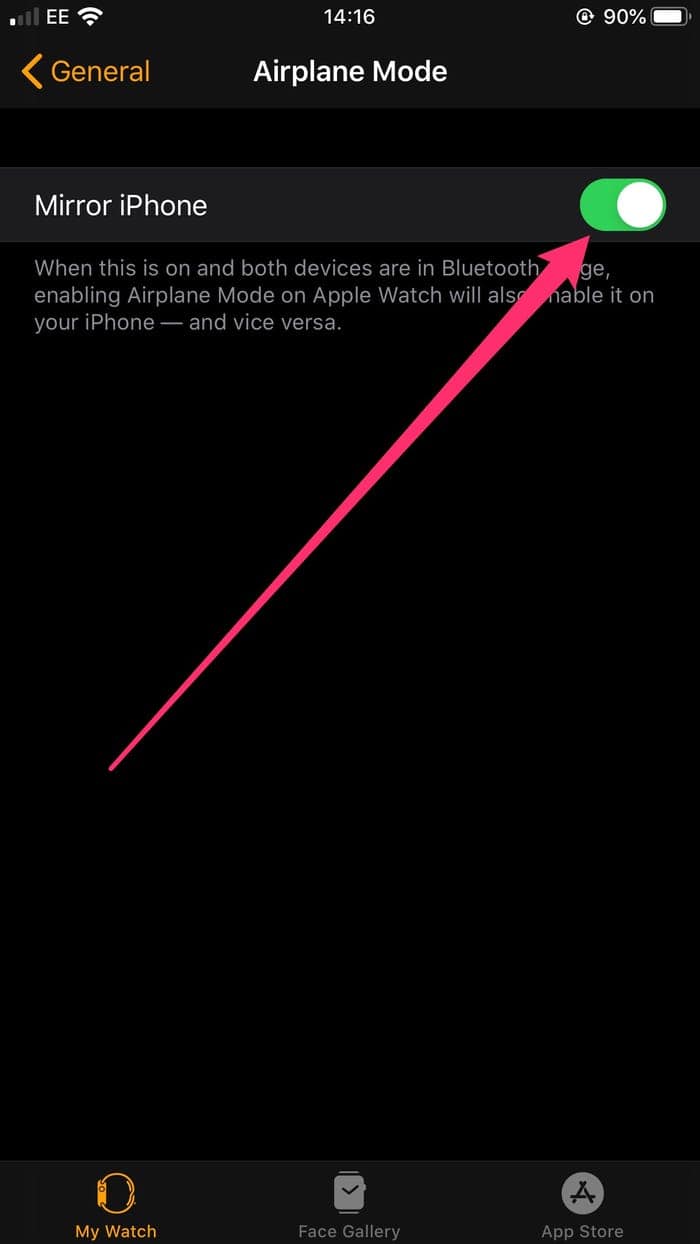

Once enabled, your Apple Watch will automatically enter Airplane Mode whenever it’s activated on the iPhone. This keeps both devices in sync, making it easier to manage wireless connections when traveling.
You can also explore more Apple Watch features like checking storage or changing text size.
Additional Tips
- You can still enable Bluetooth manually in Airplane Mode if needed for pairing accessories.
- Wi-Fi can also be re-enabled separately when the mode is active.
- Airplane Mode does not disable fitness tracking or alarms.
- Check the orange airplane icon at the top of the screen to confirm it’s turned on.
- Always disable Airplane Mode after a flight to reconnect your watch to the iPhone and network.
Conclusion
Turning on Airplane Mode on Apple Watch takes only a second and ensures compliance with flight regulations. It’s also a practical way to save battery and control wireless activity. Whether using the Control Center, Settings, or syncing with iPhone, you can manage Airplane Mode based on their preference and situation.
FAQs
No. It must be enabled manually on the watch or via the paired iPhone.
No. The watch continues to record fitness data offline.
Yes. You can turn them back on manually from the Control Center.
No. Those features work as usual without any network connection.



Discussion