

The iPhone is a complete mobile editing studio. Choosing the best editing app depends on your creative needs. Do you need RAW file control? Are you a social media fan seeking quick filters? Finding the right tool unlocks your images’ true potential. You can easily turn casual snapshots into compelling visual content.
Table of contents
Essential Tools for Mobile Content Creation
1. Adobe Lightroom Mobile
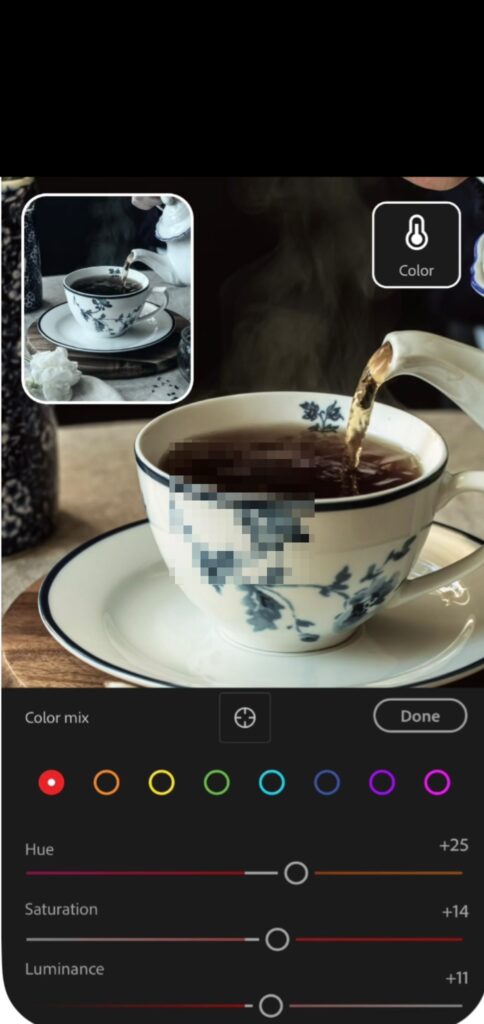
Adobe Lightroom Mobile is the gold standard for serious photographers. This application provides non-destructive editing. It syncs to desktop versions via the cloud. Users gain advanced controls for exposure and color mixing. Additionally, Lightroom handles large collections and supports RAW files. It offers the deepest technical image control on a smartphone. The app’s advanced masking features are efficient. Therefore, it is one of the best apps for editing with Apple Pencil on iPad.
2. Snapseed
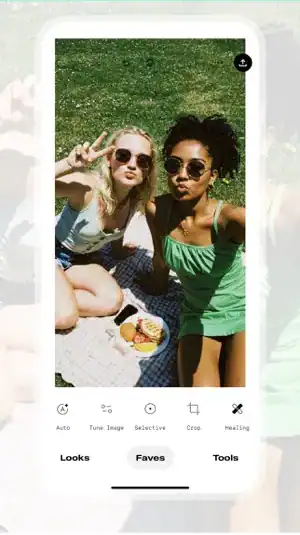
Google developed Snapseed. It is arguably the most powerful free editing app for iOS users. Snapseed boasts a comprehensive suite of tools. These tools include selective adjustments. They let users edit small areas without affecting the rest. Furthermore, the interface is intuitive. Sophisticated options like healing and perspective correction are available. Snapseed offers robust, detailed photo enhancements without subscription costs.
Don’t miss the best of The Mac Observer
Set us as a preferred source and our Apple reporting ranks higher in your Google Search results and Discover feed — one tap, no account changes.
3. LumaFusion

Your focus shifts to motion with LumaFusion. This app is the premier choice for professional video editing on iOS. It offers a multi-track timeline. Users get extensive audio mixing and color correction tools. These features help create high-quality cinematic content on the go. LumaFusion provides everything for compelling, finalized projects. You work straight from your phone or iPad. Consider exploring other popular video editing apps for creating great content on your iPhone.
4. VSCO

VSCO is a popular editing platform. It is renowned for its exceptional film-inspired presets. The platform also features a minimalist aesthetic. Beyond the filters, the app offers core editing tools. Users can fine-tune images with contrast and saturation adjustments. Conversely, it caters mainly to those seeking a cohesive look. Therefore, it is a favorite for influencers focused on atmosphere and tone.
5. TouchRetouch

Are you primarily concerned with cleaning up a perfect photo? Then consider several powerful retouching apps available for iOS. TouchRetouch is a specialized utility. It makes object removal simple and seamless. Users can quickly eliminate blemishes or unwanted people. It removes stray items using effective content-aware algorithms. Consequently, the app ensures a clean, polished final image.
FAQ
Many free apps offer excellent tools. For example, Snapseed and the built-in Photos app are strong. However, professional features often require premium subscriptions. These include RAW processing and advanced masking. Multi-track video timelines also require payment. The right choice depends entirely on your workflow complexity. It also depends on your specific output requirements.
A comprehensive photo editor focuses on overall adjustments. This includes color, exposure, and tone. Conversely, a dedicated retouching app is highly specialized. It concentrates on removing specific unwanted elements. For instance, it removes blemishes or distracting objects. It uses sophisticated content-aware filling algorithms for this task.
Selecting the Right Mobile Editing Software
Choosing the ideal iPhone editing app requires balance. You must weigh price, functionality, and ease of use. The iOS ecosystem provides powerful, diverse options. Do you need Lightroom’s precision? Or do you prefer TouchRetouch’s focused utility? By finding the application that best supports your style, you enhance your iPhone apps for photography. You will consistently achieve better results.


Discussion