
Let’s say you followed my advice and calibrated your Apple Watch for better step count and distance accuracy, but something went wonky now it’s wrong again. That’s an easy fix, and a great excuse to get outside to walk some more. Read on to learn how to reset your Apple Watch fitness tracking calibration.
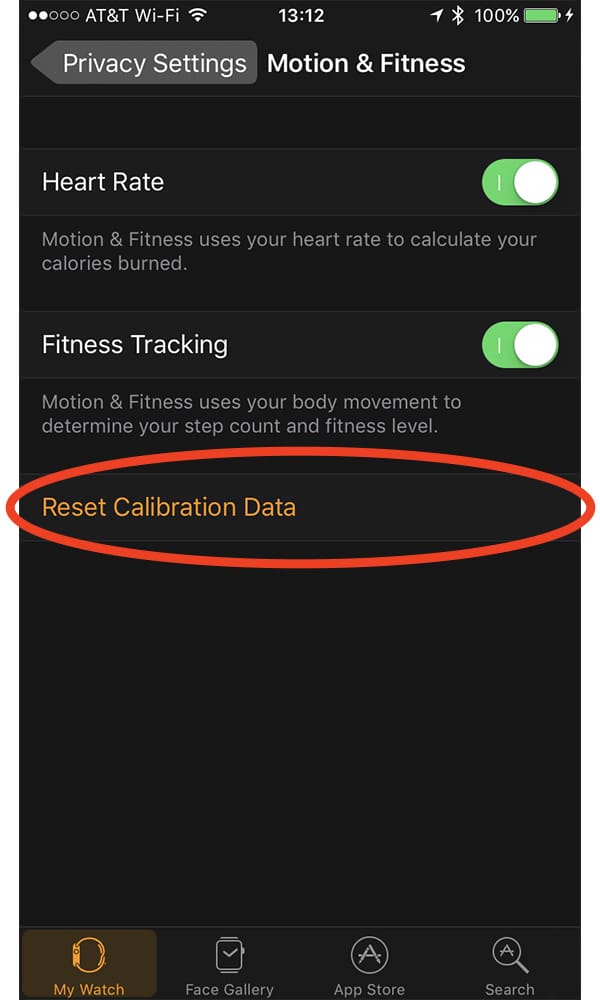
The first part of the fix happens on your iPhone. Here’s what to do:
- Launch the Watch app
- Tap My Watch
- Select Privacy
- Choose Motion & Fitness
- Tap Reset Calibration Data
Now it’s time to get outside and walk. Pick an area that’s fairly level where you can walk uninterrupted for at least 20 minutes, and make sure you have your Apple Watch and iPhone with you.
Start a new outdoor walking workout in the Apple Watch Workout app and start walking at a steady pace. After 20 minutes your Apple Watch fitness tracking is recalibrated and you’re back in business.
Don’t miss the best of The Mac Observer
Set us as a preferred source and our Apple reporting ranks higher in your Google Search results and Discover feed — one tap, no account changes.




Discussion