
Kelly Guimont and Bryan Chaffin join Jeff Gamet at Apple’s 2018 Worldwide Developer Conference to talk about ARKit 2 and what Apple is doing in the augmented reality space, plus they look at the coming end of 32-bit app support in macOS.

AT&T Raising iPhone's Grandfathered Unlimited Data Plan to $45/month
Those lucky few iPhone users grandfathered into AT&T’s unlimited data plans will see a monthly rate increase starting next month. A support article on AT&T’s website informs subscribers that, starting in July, the monthly rate will increase to $45, up from the current $40.

This $2 App Brings Amazon Alexa to Your Apple Watch...Sort Of
An Apple Watch app called Voice in a Can is seeking to satisfy the desires of those who love Apple hardware but rely on Amazon Alexa for its home automation capabilities. As a standalone app, Voice in a Can runs entirely on the Apple Watch without needing to pair with the iPhone. With just a Wi-Fi or LTE connection you ask Alexa to control your home lights, unlock the door, or set your thermostat. However, since Apple prevents third party apps from replacing Siri, you can’t use Voice in a Can to have Alexa make calls or control the audio playback on your watch. It’s by no means a perfect solution, but it’s the best Alexa users have thus far until Amazon and Apple work out an official solution. Grab it now on the App Store for $1.99.
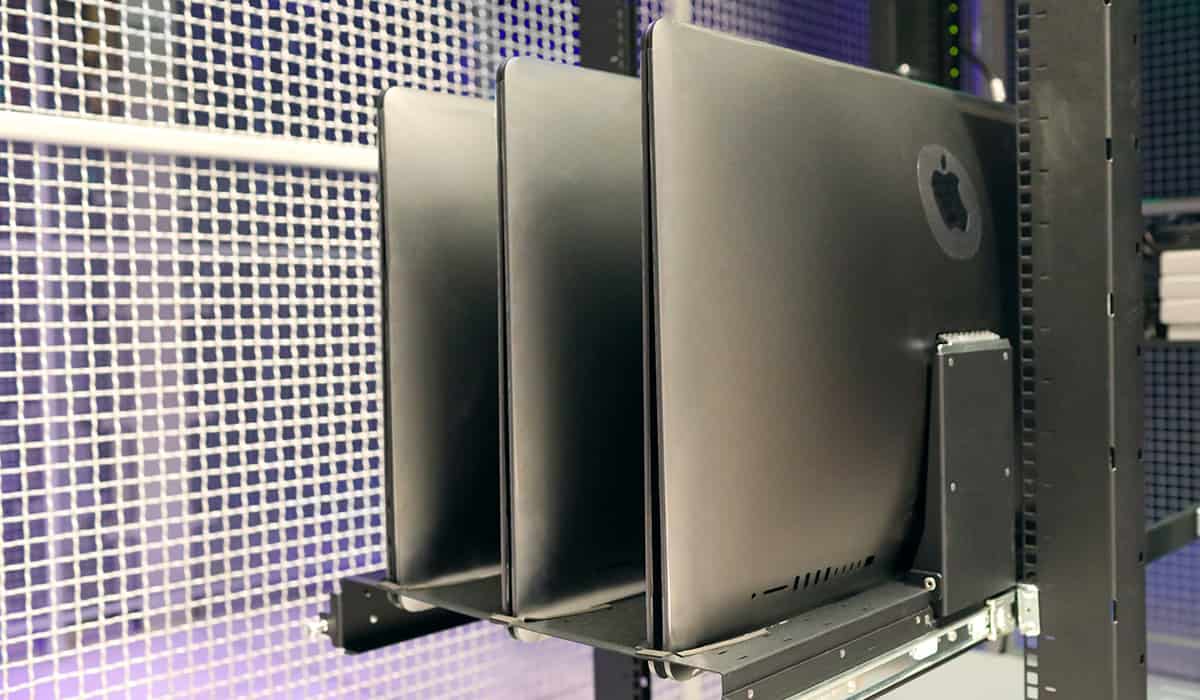
The Awesome Insanity of Rackmounting the iMac Pro
Do you have a powerful new iMac Pro? If so, do you want to rackmount it? No, of course you don’t, because that would be bananapants crazy. But there’s at least one company that has need for such a monstrosity: MacStadium, the Mac-based hosting provider. Spotted by Zac Cichy on Twitter, the iMac Pro rack lets MacStadium offer remote access to the powerful capabilities of Apple’s newest Mac in a way that fits their existing equipment infrastructure. Of course, this isn’t the first time that a company has laughed in the face of Apple’s mission to destroy industry standard form factors.

New Class Action Lawsuit Claims All Apple Watch Models Have Defective Screen Design
A new class action lawsuit has been filed against Apple alleging the existence of a defect in all Apple Watch models that causes the display to crack, shatter, or detach from the watch body, and further claims that Apple knew about the issue from the start.

Apple Maps Now Embeddable on the Web With MapKit JS Beta
Apple is expanding the use of Apple Maps on the web with the release of the MapKit JS API to developers. With access to this API, developers can embed interactive Apple Maps directly into their websites and web applications.

Safari Technology Preview 58 Introduces Icons in Tabs, Strong Password Generation
The Safari 12 features Apple announced at WWDC, including favicons and strong password generation, are now available in Safari Technology Preview 58 for both macOS Mojave and macOS High Sierra.

Apple Orders Dramedy 'Little Voices' Produced by J.J. Abrams and Sara Bareilles
Apple is continuing to expand its catalog of original TV shows by ordering a new dramedy called ‘Little Voices’ from producers J.J. Abrams and Sara Bareilles. The music-heavy show will focus on 20-somethings finding their way in New York City.

The First Investors Summit Dedicated to Long-Term AAPL Investors
Are you long on AAPL? Hate how the mainstream market analysts never seem to “get it?” Well, then be sure to check out the first annual Apple Summit, a first-of-its-kind investor summit dedicated to long-term investors in Apple.

Apple Shifts Developers from iTunes Connect to App Store Connect
The service comes with a new iOS app and a browser-based portal for uploading apps, managing apps and updates, using analytics, managing in-app purchases, and more.