

A brief purple flash may appear when you close an app on iOS 26.1 devices. You can stop this by disabling a particular visual setting.
Table of Contents
Solutions for the Purple Screen Flash in iOS 26.1
Disable the Reduce Transparency Setting
As reported by an user in Apple’s support forums, simply tweaking an accessibility option fixes the issue. Here’s how to do that:
Time needed: 5 minutes
- Open Settings > Accessibility.

- Go to Display & Text Size.
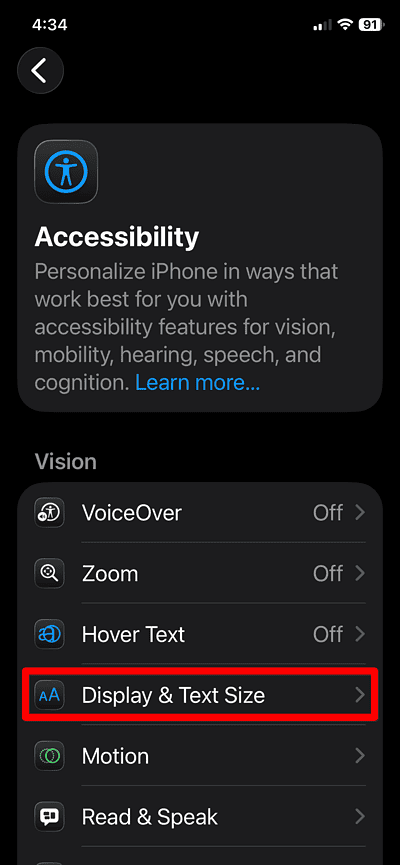
- Scroll to Reduce Transparency and toggle it Off.
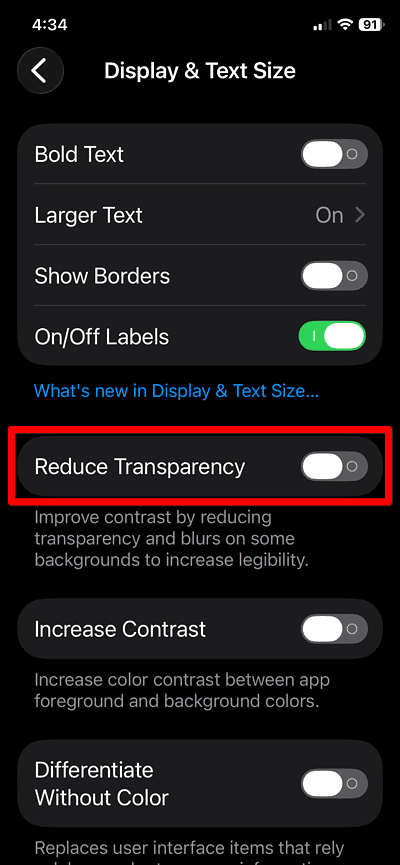
- Swipe up from the bottom to close an app and watch for the purple flash.
- If the flash no longer appears, the fix succeeded.


Report the Bug to Apple Feedback (Optional)
- Go to Settings > General > About > Feedback Assistant (or visit Apple’s Feedback website).
- Describe “purple flash when closing apps on iOS 26.1” and note you disabled Reduce Transparency.
- Submit the report to help Apple track the issue.
Tips
- Update to the latest iOS version via Settings > General > Software Update to receive bug fixes.
- Restart your iPhone after disabling visual settings to ensure the change applies fully.
- If you use a case or screen protector, ensure it does not influence screen rendering or transitions.
- Keep visual effects minimal if you frequently notice screen flashes or color anomalies.
Purple Flash in iOS 26.1: FAQ
Yes. Turning it off reduces background blur and transparency system-wide, which may change how some interface elements appear.
No. According to reports, the purple flash appears only on iOS 26.1 when visual transparency is enabled. It is not linked to hardware fault. Cases like the Purple Screen of Death and Pink Screen of Death usually are tied to iPhone hardware damage, but these are different issues.
In this case, the issue is likely a bug with the animation when closing an app and going to the home screen. Other causes may be related to a glitch with low brightness settings or pink and purple flashes right before the screen turns off.
Summary
- Disable Reduce Transparency
- Restart iPhone
- Report bug to Apple (optional)
- Update iOS when available
If you see a momentary purple flash when closing apps on iOS 26.1, the steps above will stop it. Disabling the transparency setting removes the visual bug. If it persists after following these fixes, contact Apple Support for further assistance.
Don’t miss the best of The Mac Observer
Set us as a preferred source and our Apple reporting ranks higher in your Google Search results and Discover feed — one tap, no account changes.




Discussion