

Need to find out who called you yesterday, or three weeks ago? Your iPhone makes it easy to see your full call history, complete with incoming, outgoing, and missed calls. In this guide, we’ll show you the fastest ways to view, search, and manage your call log so you never miss important details.
Table of contents
Before you start
- Make sure your iPhone is turned on and unlocked.
- Confirm you’re running a recent version of iOS for the smoothest experience.
- If you use multiple devices, check iCloud settings so call history syncs across iPhone, iPad, or Mac.
How to Check Call History on iPhone
1. Open the Phone app
- Tap the green Phone icon from your Home Screen or App Library.
- At the bottom of the screen, select Recents. This shows a chronological list of incoming, outgoing, and missed calls.
- Swipe up to browse older calls. iPhones typically display the most recent 100 entries, but the system keeps more in storage.
- For any number, tap the ℹ️ button to view call duration, exact time, and whether it was audio or FaceTime.
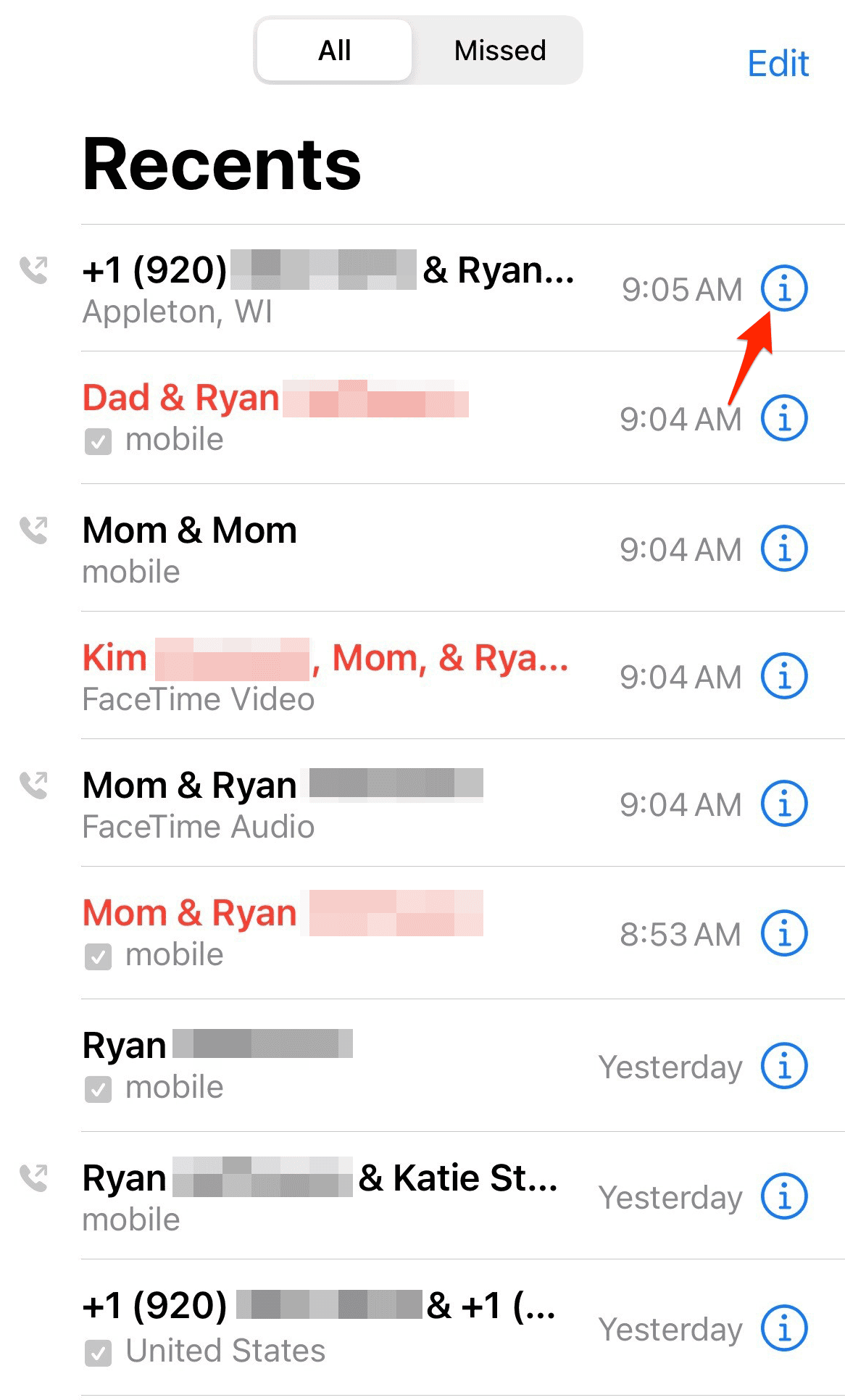
- Swipe down in the Phone app to reveal the search bar. Type a name or number to locate specific calls.
- If you have iCloud Drive enabled, your call history can sync across devices. Check under Settings > [Your Name] > iCloud > iCloud Drive to confirm.

Tips
- Clear your log occasionally for privacy.
- Use FaceTime’s own app if you want to filter video and audio calls separately.
- If you need call logs for work, take periodic screenshots or export data with trusted tools.
- Carrier apps may provide a longer official call record than what your iPhone shows.
FAQs
By default, your iPhone shows the most recent 100 calls in Recents. Older entries are still saved but may not be visible unless restored from iCloud or checked with your carrier.
Deleted entries disappear from the Phone app, but you may recover them from iCloud backup or carrier records.
Apple doesn’t offer a native export option. You can take screenshots for records or use trusted third-party apps for backups.
Yes, if iCloud Drive is enabled, call logs can sync to other Apple devices signed into the same Apple ID.
Open the Phone app > Recents > Edit > Clear to remove all entries, or swipe left on an individual call to delete it.
Conclusion
Checking your call history on iPhone takes just a few taps, whether you’re looking for a missed call or tracking an important client conversation. Between the Recents tab, iCloud syncing, and carrier records, you always have multiple ways to keep tabs on who’s been calling, and when.
Don’t miss the best of The Mac Observer
Set us as a preferred source and our Apple reporting ranks higher in your Google Search results and Discover feed — one tap, no account changes.


Discussion