

You can now install uBlock Origin on iOS as a Safari extension. The new Lite version works on iPhone, iPad, and macOS, and you can enable it in a few steps using Safari’s extension controls.
Table of contents
What you need before installing
Before you install uBlock Origin Lite, make sure your Apple device runs a supported version of iOS, iPadOS, or macOS with Safari extensions enabled.
Supported devices
You need an iPhone or iPad running the latest version of iOS or iPadOS. The extension also works on macOS through Safari’s extension framework.
Don’t miss the best of The Mac Observer
Set us as a preferred source and our Apple reporting ranks higher in your Google Search results and Discover feed — one tap, no account changes.
Check your software version
Make sure your device runs the newest OS version available. Safari extensions depend on updated system frameworks to work correctly.
How to install uBlock Origin Lite in iOS

Follow these steps to download uBlock Origin Lite on your iPhone or iPad and enable it in Safari.
Time needed: 10 minutes
- Open the App Store on your iPhone or iPad.
- Search for uBlock Origin Lite.
- Download and install the extension on your device.
- Open the Settings app.
- Tap Safari and select Extensions.
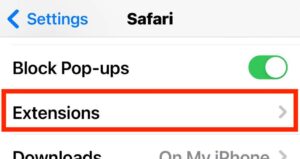
- Turn on uBlock Origin Lite to enable it.
- Tap uBlock Origin Lite again and grant the extension permission to filter content on all websites.
- Open Safari and browse to confirm that ads and trackers are blocked.

How to adjust filtering settings
You can manage filtering behavior for uBlock Origin Lite directly from Safari’s extension menu in iOS.
- Open Safari and tap the AA icon in the address bar.
- Tap Manage Extensions.
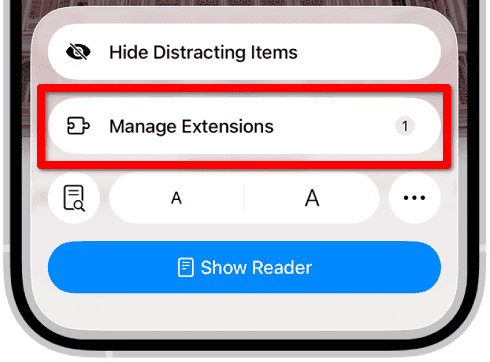
- Tap uBlock Origin Lite and modify the site permissions as needed.
- Reload the page to apply your updated filtering rules.

uBlock Origin for iOS: common issues and fixes
If the extension doesn’t work as expected, these steps can help fix the issue quickly.
The extension is not blocking ads
Check that the extension is enabled in both Settings and Safari’s in-app extension menu. Reload the page to refresh content-filtering rules.
uBlock Origin Lite missing from Extensions in iOS
If the extension does not appear, restart your device and update iOS or iPadOS. Older versions of Safari may not display newly installed add-ons.
Slow page loads after enabling
Content blockers sometimes increase initial load times on tracker-heavy websites. Try toggling the extension off for specific pages if needed.
Tips
- Update iOS or iPadOS to get the best compatibility with the uBlock Origin Lite Safari extension.
- Enable uBlock Origin Lite in both system Settings and Safari’s in-app menu.
- Reload web pages after toggling content-blocking permissions.
- Use site-specific settings to allow or restrict blocking as needed.
- Restart your device if the extension does not appear immediately after installation.
uBlock Origin for iOS: FAQ
Yes. Safari requires you to manually enable the extension under Settings > Safari > Extensions after installation.
No. Apple restricts third-party browsers from using full content-blocking extensions. Only Safari supports them.
This usually happens when the device needs a restart or the OS is outdated. Updating iOS and rebooting fixes it for most users.
The Lite version uses Apple’s WebExtension APIs, so some advanced filtering is simplified, but it still blocks ads and trackers effectively on Safari.
Summary
- Download uBlock Origin Lite from the App Store on your iOS device.
- Enable it under Settings > Safari > Extensions.
- Adjust site-level permissions through Safari’s in-app extension menu.
- Update your OS to ensure full compatibility with Safari extensions.
- Restart your device or reload pages if the extension does not activate immediately.
Installing uBlock Origin Lite in iOD is quick once the extension is enabled in both Settings and Safari. After setup, it blocks ads and trackers across your browsing sessions with minimal configuration.


Any tips for fixing PiP playing? I use YouTube on Safari specifically for the ad blocking, but even with restarting the picture-in-picture feature doesn’t work. Not sure if there’s something I’ve blocked it with, if there’s a way to fix it, an incompatibility with the iOS version I’m using, or if it’s a bug of some sort…