

The shift from traditional plastic SIM cards to eSIM technology has revolutionized how we connect. For users of the iPhone 12 series, understanding connectivity features is crucial, especially regarding Dual SIM capabilities. The embedded SIM, or eSIM, allows for greater flexibility, security, and convenience, eliminating the need to physically swap cards. This model’s support for the technology offers a robust solution for managing separate personal and professional lines, aligning with modern mobile demands.
Table of contents
Dual SIM on iPhone 12: Physical and Embedded

Yes, the iPhone 12, iPhone 12 mini, iPhone 12 Pro, and iPhone 12 Pro Max all support the use of an eSIM. This feature is enabled through Dual SIM with eSIM, meaning the phone utilizes one physical Nano-SIM card and one digital eSIM. This configuration allows a user to have two active cellular plans simultaneously on the same device.
For instance, you could use one plan for local calls and data and a second plan, perhaps a work number or an international plan, on the eSIM. This eliminates the hassle of carrying two separate phones. It is important to note that the Dual SIM feature is standard across the entire iPhone 12 lineup, providing consistent and reliable connectivity options regardless of the specific model.
Don’t miss the best of The Mac Observer
Set us as a preferred source and our Apple reporting ranks higher in your Google Search results and Discover feed — one tap, no account changes.
Activating Your New iPhone 12 eSIM
Getting your eSIM functional on the iPhone 12 is a process that is typically initiated using a unique QR code or a manual activation code provided by your wireless carrier or eSIM provider. Ensure your device is connected to Wi-Fi before beginning. Follow these steps to activate your digital SIM and add a second line to your device:
- 1. Access Cellular Settings: Go to the Settings app on your iPhone.
- 2. Select Setup: Tap Cellular (or Mobile Data), and then tap Set Up Cellular or Add eSIM.
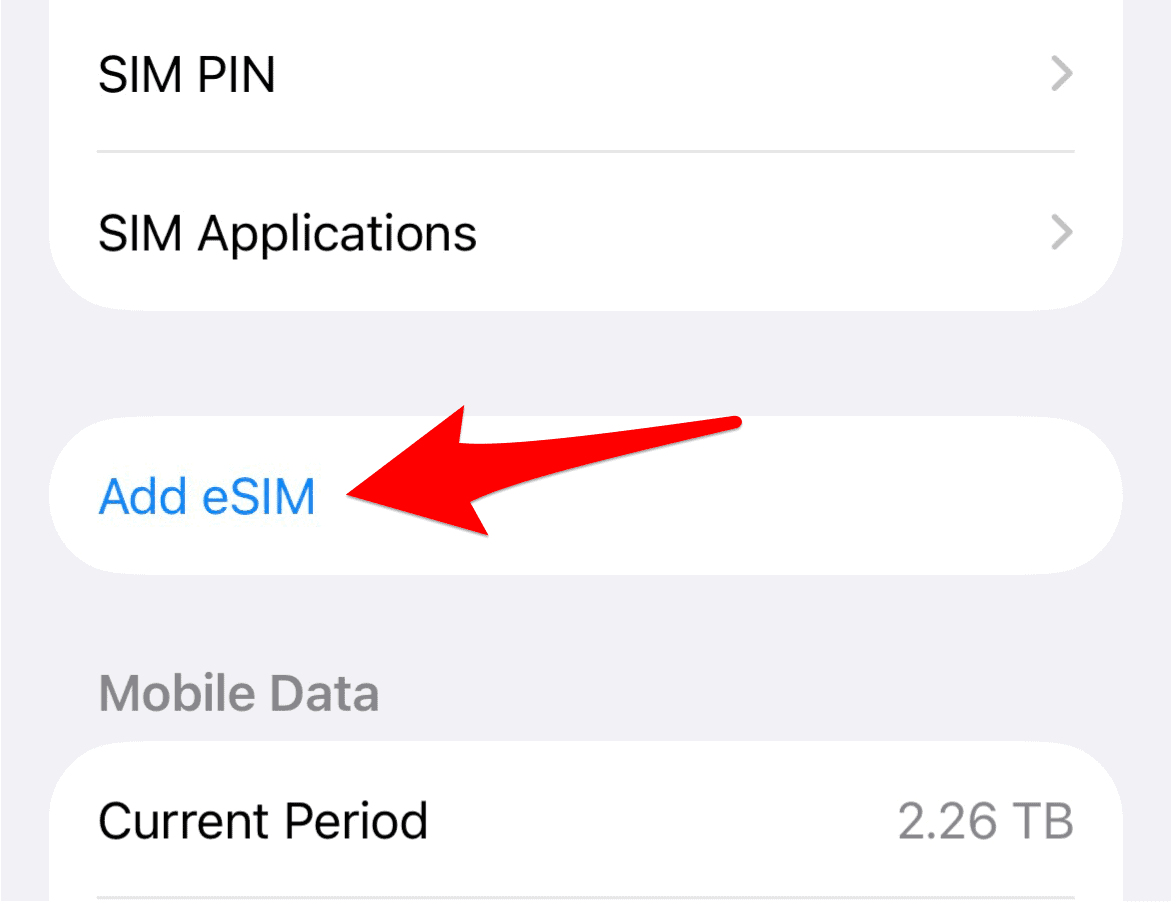
- 3. Choose Activation Method: Tap Use QR Code. This will open your camera. (Alternatively, you may select Enter Details Manually if your carrier provided activation details instead of a code).
- 4. Scan or Enter Details: Position your iPhone to scan the QR code provided by your carrier. If entering manually, input the required SM-DP+ Address and Activation Code.
- 5. Complete Activation: Follow the remaining on-screen instructions to download and install the digital plan. You may be prompted to enter a confirmation code from your carrier to finalize the process. If you encounter issues, you may need to consult instructions for resolving an iOS 17 SIM failure if the problem occurred following a system update.

Troubleshooting eSIM and SIM Connectivity Issues
While eSIM technology is reliable, connectivity issues or errors like “No SIM Available” can sometimes occur, often after a software update or during international roaming. Here are the troubleshooting steps you can take to resolve common SIM and eSIM errors on your iPhone 12, ensuring a stable connection:
- Check iOS and Carrier Settings: Ensure your iPhone 12 is running the latest iOS version. Then, check for carrier settings updates by going to Settings > General > About.
- Toggle the eSIM Line: Go to Settings > Cellular and select the eSIM line. Turn off the Turn On This Line toggle, wait a few seconds, and then turn it back on.
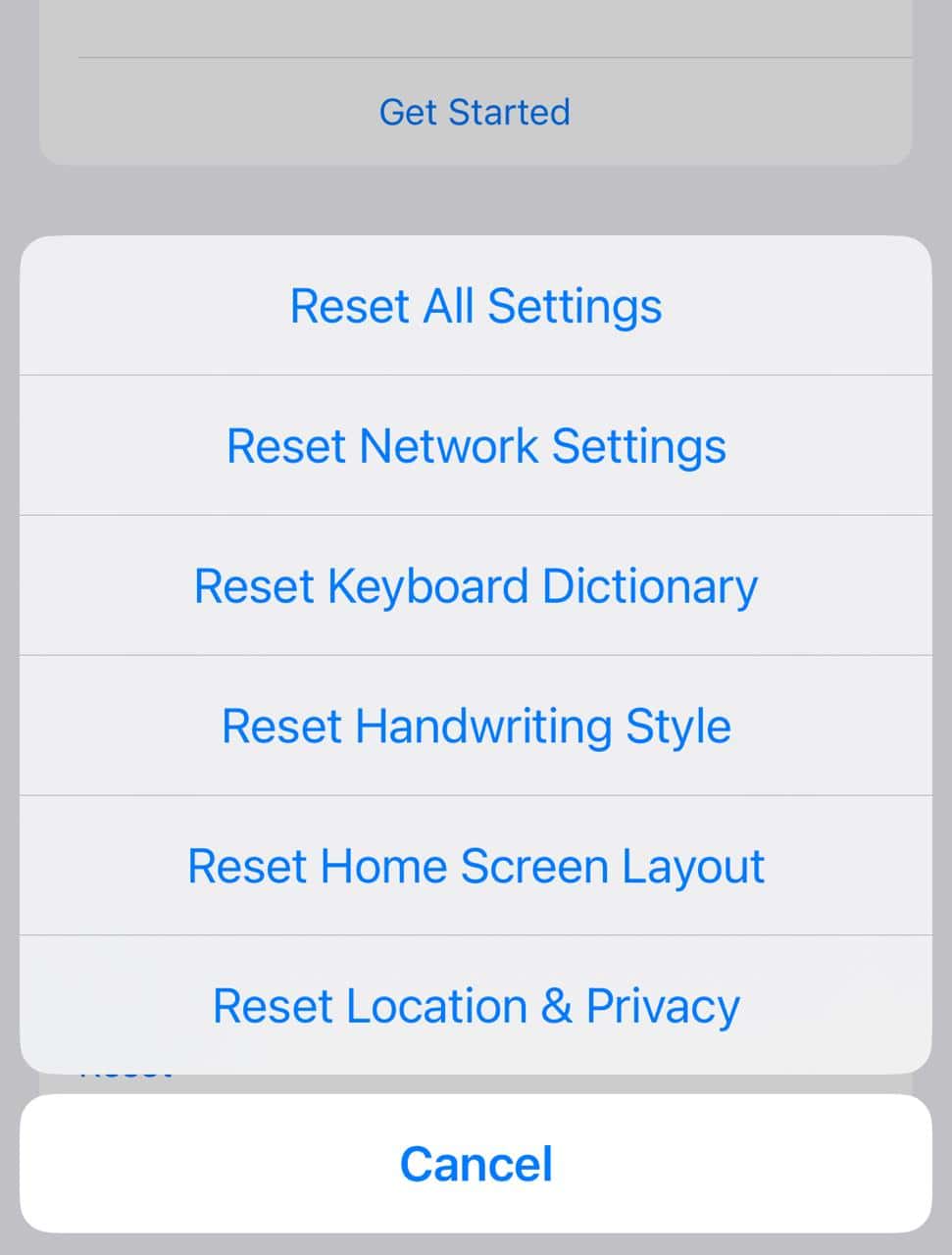
- Reset Network Settings: This will erase all saved Wi-Fi passwords and cellular configurations, which can clear glitches. Go to Settings > General > Transfer or Reset iPhone > Reset > Reset Network Settings.
- Restart Your Device: A simple restart can often clear temporary connectivity bugs.
- Reinstall eSIM Profile: If the issue persists, you may need to delete the eSIM profile from the cellular settings and reinstall it using the original QR code or carrier instructions.
- Check Dual SIM Requirements: Ensure your iPhone is unlocked, or that both the physical SIM and eSIM plans are from the same carrier. If you’re seeing a continuous issue, you can check guides on how to fix a no SIM available or invalid SIM error for detailed steps.

FAQ
No, the iPhone 12 supports one physical Nano-SIM and one eSIM for Dual SIM functionality. Only newer models like the iPhone 13 and later support two active eSIMs.
eSIM availability depends on carrier support in your specific region and the specific carrier you are using. You can also learn how to fix the iPhone “No SIM Card Installed” error, which is sometimes caused by a SIM seating issue.
The Evolution of Mobile Connectivity and Security
The adoption of eSIM in the iPhone 12 marks a significant step toward a fully digital mobile future. Its reliability and ease of use, especially for those who require multiple lines or frequent international travel, showcase its superiority over the traditional plastic card. This technology streamlines your connection management, minimizing potential hardware errors and paving the way for further advancements. For an extra layer of security, you can also learn how to lock your SIM on iPhone with a PIN to prevent unauthorized use if your device is lost or stolen


Lost qr code