
Apple made it easy to block videos that autoplay on websites in Safari on macOS High Sierra, which is awesome. You can do the same in Google Chrome, too, once you know where to look.
To stop autoplay videos in Google Chrome on your desktop or laptop computer, enter this in the URL and search field:
chrome://flags/#autoplay-policy
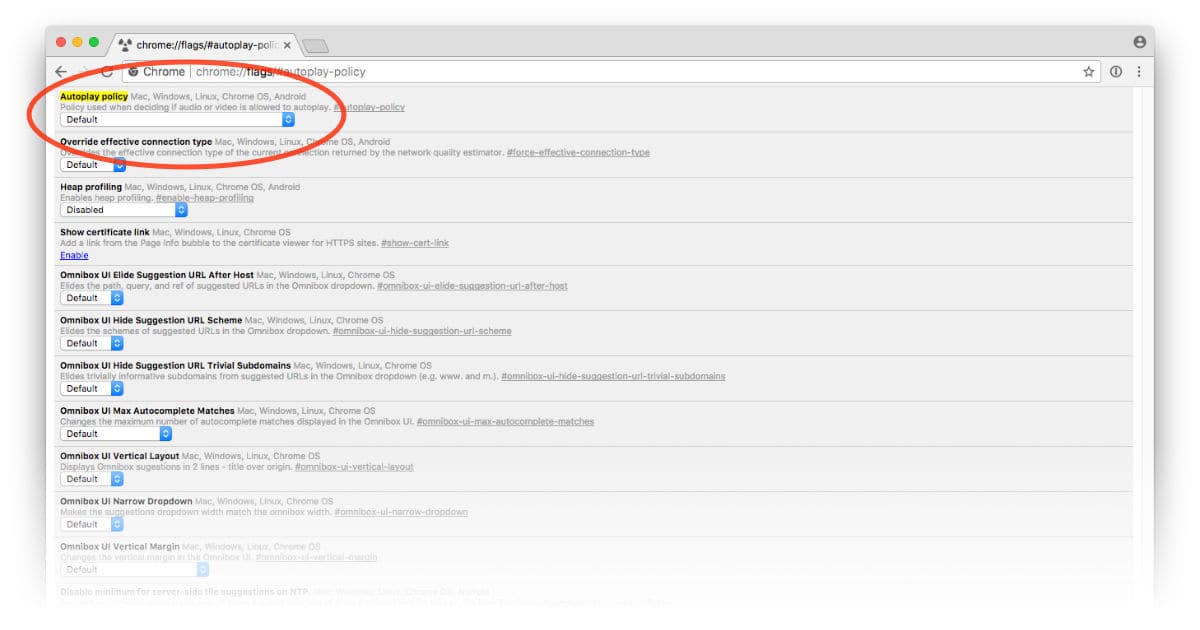
Now change Autoplay policy from Default to Document user activation is required, then click Relaunch Now. Once Chrome starts up again you’ll be able to surf the Web without having to deal with those annoying videos that automatically play when you visit a website or scroll through a page.
Don’t miss the best of The Mac Observer
Set us as a preferred source and our Apple reporting ranks higher in your Google Search results and Discover feed — one tap, no account changes.




This tip worked better for me than other Chrome tips I have seen. It stopped autoplay in Youtube (which doesn’t seem to respond to its own autoplay settings).
This does not work, at least on CNN. I had to install the “Disable HTML5 Autoplay” extension.