

After updating to iOS 26, some users have noticed a strange issue where music or audio stops playing as soon as they close or switch away from the Facebook app. It doesn’t matter whether you’re streaming music from Apple Music, Spotify, or YouTube — once Facebook is closed, the playback pauses automatically.
I ran into this myself recently, and after checking community forums and Apple’s own discussion threads, it turns out this problem isn’t rare. The issue appears to be linked to how Facebook interacts with iOS background app behavior and how the latest updates handle active audio sessions. Let’s look at what causes it and how you can fix it.
Table of contents
Common Causes
This issue isn’t a hardware fault but rather how Facebook behaves in the background on iOS 26. When you close or swipe it away, Facebook often suspends its background processes more aggressively than other apps. That can interrupt active services like Apple Music, Spotify, or YouTube playback. The problem has become more noticeable after recent iOS updates, which tightened background task management to save battery life.
Don’t miss the best of The Mac Observer
Set us as a preferred source and our Apple reporting ranks higher in your Google Search results and Discover feed — one tap, no account changes.
Another possible cause is that Facebook’s background refresh or battery permissions are limited. If these settings are turned off, iOS may treat Facebook as completely closed when you exit it, pausing any ongoing audio. In some cases, outdated app versions or cached data can also trigger this issue after system updates. Thankfully, these are simple to fix with a few quick adjustments.
1. Update Facebook and iOS
Always start with updates. Both Facebook and iOS receive frequent patches to fix compatibility issues like this one.
- Open the App Store.
- Tap your profile photo and scroll to find Facebook.
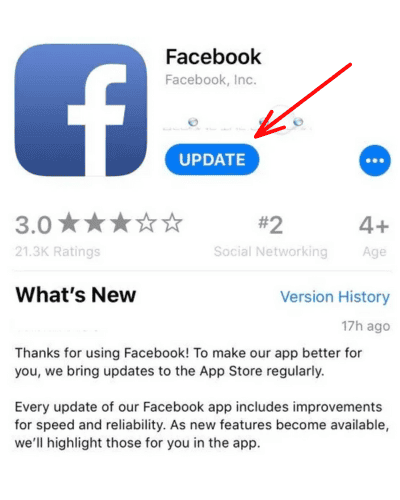
- If an update is available, tap Update.
- Then open Settings → General → Software Update and install any pending iOS updates.

This often fixes background audio issues, since updates optimize how apps interact with the new iOS framework.
2. Check Background App Refresh Settings
When Facebook is prevented from running in the background, iOS might treat it as fully closed, which interrupts ongoing media sessions.
- Go to Settings → General → Background App Refresh.
- Make sure Background App Refresh is turned On.
- Check that Facebook is enabled in the list.
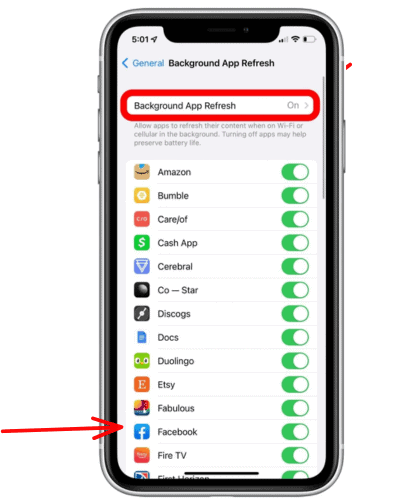

This allows Facebook to remain suspended rather than being force-terminated when you exit it, keeping music playback uninterrupted.
3. Avoid Force-Closing Facebook
If you habitually swipe Facebook away from the App Switcher, stop doing that for now.
When you swipe up to remove Facebook entirely, iOS kills all background tasks linked to the app, which sometimes affects global audio playback. Instead, return to the Home Screen or switch to another app normally.
It might sound small, but this change can stop music from pausing mid-track.
4. Clear Facebook App Cache
Clearing cached data can fix performance conflicts that interfere with system audio.
- Open the Facebook app.
- Go to Menu → Settings → Browser → Clear Cache.
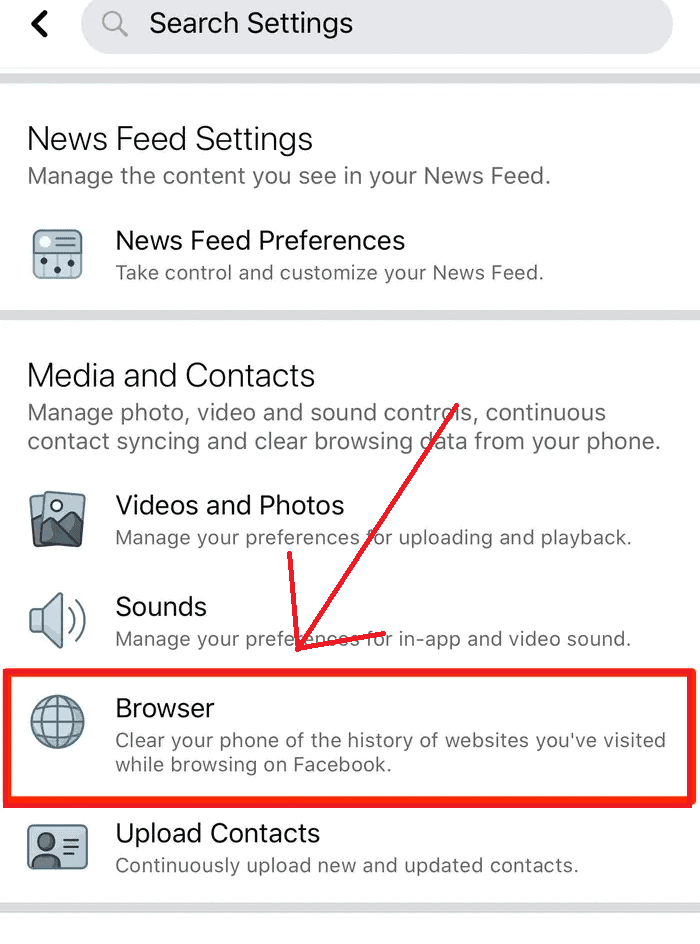
- Restart your iPhone.

Clearing the cache helps when background processes have become unresponsive due to memory usage or old temporary files.
5. Reinstall Facebook
If the issue continues, reinstalling Facebook can reset all app permissions.
- Press and hold the Facebook icon.
- Tap Remove App → Delete App.
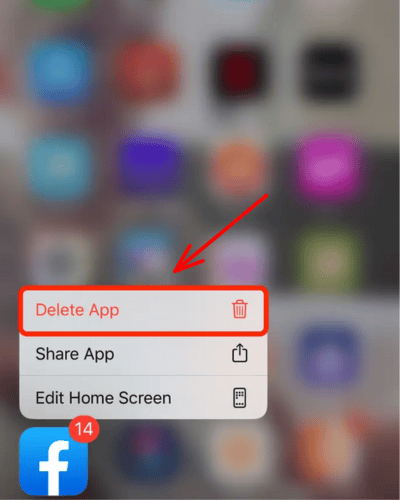
- Reinstall Facebook from the App Store.

This also helps if your version of Facebook was installed before the latest iOS 26 update and hasn’t been re-optimized yet.
If you’re also facing startup errors, check out how to fix Facebook not launching after iOS 18 — many of those solutions apply here too.
Tips to Prevent Future Audio Interruptions
To reduce the chance of this happening again:
- Keep Facebook and iOS up to date.
- Avoid swiping apps away from the App Switcher too often.
- Restart your iPhone at least once a week.
- Check for pending app permissions after every major update.
- If your AirPods disconnect during playback, read how to fix iOS 26 not connecting to AirPods.
Small maintenance steps like these keep apps running smoothly and prevent unwanted playback interruptions.
Conclusion
If your music or audio stops when closing the Facebook app, it’s not a malfunction but a side effect of how iOS 26 manages background app behavior. Updating Facebook, avoiding force closes, and allowing background refresh usually fix it.
I’ve found that after making these changes, Spotify and Apple Music continue playing even when switching away from Facebook. For most users, it’s just about adjusting a few system settings rather than waiting for a major patch.
If you also use iMessage or FaceTime, and you’re seeing activation errors, check how to fix iMessage and FaceTime not activating on iOS 26 for more iOS-specific solutions.
FAQs
Because Facebook is suspended or closed by iOS when leaving the foreground, it interrupts background audio streams.
It’s a combination of both. Facebook hasn’t fully optimized its app for iOS 26’s new multitasking framework.
Yes, it often helps by resetting app permissions and background behavior.
Yes, enabling Background App Refresh and avoiding force-closing the app often restores normal playback.
Not as frequently, since Facebook uses a heavier background process model than those apps.


Discussion