

Protecting kids’ communication is essential today. iMessage is a key platform for children. Good parental monitoring offers peace of mind. It shows you conversations and manages screen time. Furthermore, it often includes location tracking. Choosing the best parental software is a critical first step. It helps create healthy digital habits. You protect your child from online risks. For a complete overview, explore the best iPhone monitoring apps for parents.
Table of contents
Evaluating Top Monitoring Apps for iOS Safety
1. Bark: AI-Powered Safety and Social Media Monitoring
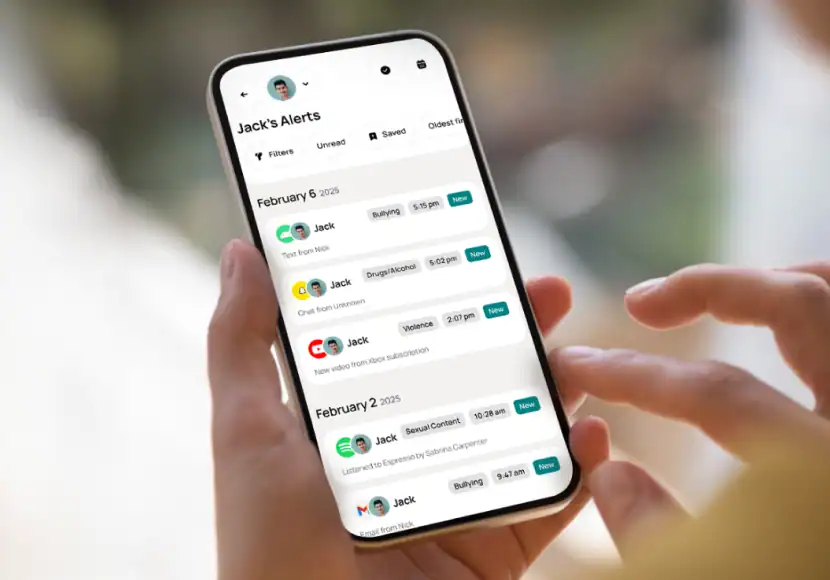
Bark uses advanced Artificial Intelligence (AI). This AI finds dangers on over 30 popular platforms. This includes text messages and social media. Significantly, Bark alerts you only to concerning content. It focuses on cyberbullying or self-harm. This respectful method helps parents focus. They address serious issues promptly. Bark also provides useful screen time management features.
2. Qustodio: Comprehensive Filtering and Time Management

Qustodio provides strong application control. Moreover, it filters websites across the iOS system. Parents instantly block inappropriate content. They also set firm daily screen time limits. This effectively reduces distractions. The platform works across various operating systems. Consequently, families manage all devices easily. Detailed activity reports are available. Finally, a Family Locator adds a safety layer.
Don’t miss the best of The Mac Observer
Set us as a preferred source and our Apple reporting ranks higher in your Google Search results and Discover feed — one tap, no account changes.
3. Apple Screen Time: Leveraging Native iOS Tools

Some parents prefer the built-in option. Apple’s native Screen Time is powerful and free. It easily facilitates setting downtime schedules. Parents also establish content restrictions. Importantly, Communication Safety scans incoming photos. It warns the child first to promote correction. This provides a simple safety approach. Additionally, it links effortlessly with Family Sharing. It is the simplest way to protect your kids online.
4. FamiSafe: Advanced Location and Activity Tracking

FamiSafe excels in location services. It provides real-time GPS tracking. It features strong geo-fencing capabilities. These tools notify parents immediately. They alert parents when a child leaves a “safe zone.” FamiSafe tracks history on TikTok and YouTube. Thus, parents gain insight into content trends. They see their child’s digital routine clearly.
5. WebWatcher: Detailed Device Insight

WebWatcher focuses on thorough device insight. It records detailed activity logs. This includes texts, photos, and websites. This application suits parents needing deep oversight. It offers a historical log of device use. You can access it from any web browser. Its capability to capture deleted texts is useful. Therefore, parents can review all communications. Furthermore, iMessage users can easily send voice messages, which require monitoring.
FAQ
Monitoring a minor child’s device is usually lawful. Parents must legally own the device. The child must also be below the privacy consent age. This age varies by region. However, experts recommend full transparency. Discussing the app fosters greater trust. This partnership approach encourages responsible tech use.
Older teens may bypass native controls. Apple Screen Time is sometimes circumvented. However, premium third-party apps are much harder to bypass. Many solutions include tamper-proof settings. They also offer robust uninstall protection. Children cannot simply delete the application. This ensures better security and accountability.
Securing Your Family’s iMessage Communication
Selecting the right digital safety tool depends on many factors. Consider your family’s unique needs first. Think about your child’s age and your philosophy. The goal is always a safer digital environment. Choose AI alerts or comprehensive controls. Always combine software with open discussions. Talk to your family about online risks. Teach them responsible technology use. For more ways to improve your iOS experience, consider these must-have apps to install on your new iPad.


Discussion