

If you’re in charge of quality management and you’re running Mac hardware, finding the right software can feel like walking through a minefield. Many quality management systems (QMS) cater to Windows or are built as web-services with uncertain Mac support. But here’s the thing: thanks to cloud-based and browser-friendly applications, Mac users have excellent choices. This article walks you through what matters in a quality management tool for macOS, what features to prioritise, and which platforms are standing out right now.
Table of contents
What defines “quality management software”?
Quality management software helps you track and manage processes that ensure your products or services meet specific standards—everything from internal audits and non-conformance reports to CAPA (corrective and preventive action), document control, training logs and supplier management. On macOS, you want software that:
- Works fully in a browser or has a native Mac client
- Supports core QMS modules: audits, document control, CAPA, training
- Has a clear, reliable user interface that Mac users will appreciate
- Integrates with other systems or allows data export
- Is scalable, so you won’t outgrow it in a year
Sites like Capterra list QMS software compatible with Mac or browser-based, naming tools such as SafetyCulture and QT9 QMS among the top. No matter your business size, Mac users can now access quality management solutions without forcing a Windows box into the mix.
Don’t miss the best of The Mac Observer
Set us as a preferred source and our Apple reporting ranks higher in your Google Search results and Discover feed — one tap, no account changes.
Key features to prioritise
1. Audit & non-conformance workflows
You’ll want efficient workflows for creating audits, tracking findings, assigning actions and closing issues. When these flows are clear and fast, you reduce risk.
2. Document control
A lot of quality work lives in controlled documents—procedures, work instructions, specs. The QMS needs a versioned document library that works well on Mac and in the browser.
3. CAPA/training modules
Once an issue surfaces, you need corrective action, root cause documentation and training assignments. The best tools let you assign and track training and follow through to closure.
4. Dashboards & reporting
Quality teams need oversight—how many open CAPAs, audit completion rates, supplier issue trends. Make sure your tool gives you real-time visibility.
5. Compliance & integrations
If you’re subject to ISO 9001, ISO 13485 or FDA regs, your QMS should help you meet those. Also check that it plays nicely with your Mac-based ecosystem (e.g., cloud drives, single-sign-on).
Top picks for Mac or browser-based QMS
Qualio
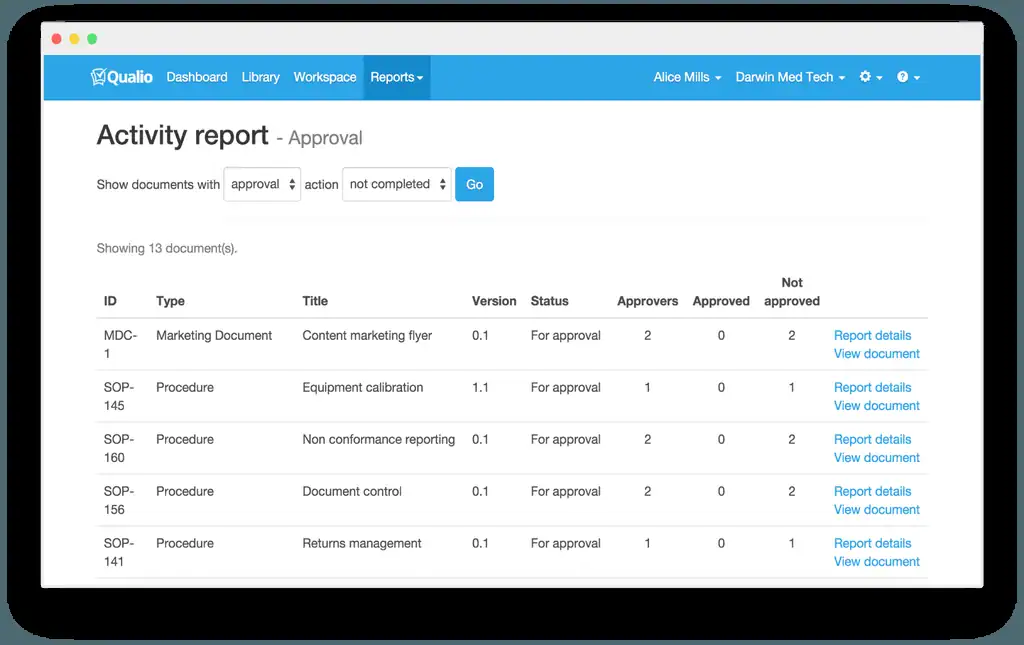
Image Source: Sourceforge
Qualio is built for highly regulated environments—life sciences, med-tech and similar. It runs in the browser (meaning full compatibility with your Mac) and supports document control, training records, CAPAs and audits with pre-built templates. If you’re in a field where audit-readiness matters, this is a strong contender.
Effivity QMS

Image Source: Effivity
Effivity is a no-code tool designed for standardisation. Even if you’re not running a huge team or complex supply chain, it offers modules for audits, supplier management, training and reporting. It’s cloud-based and effectively platform-agnostic—including Mac. Its drag-and-drop interface appeals if you want something you can adapt rather than rigid.
SafetyCulture (formerly iAuditor)

Image Source: safetyculture
If your quality efforts lean more toward inspections and operational checks—field teams, manufacturing floors, service workflows—SafetyCulture is worth a look. It’s browser and mobile friendly, Mac users included, and its user feedback shows high ease of use.
QT9 QMS

Image Source: qt9software
Another widely rated tool, QT9, is praised for modularity and user-friendliness. It supports CAPA, audits, document control, and training with a cloud-based architecture. Mac users benefit since it’s browser-first.
Choosing the right one for you
Here’s how to decide what fits:
- Are you a small team doing basic audits and CAPA? Start simple and focus on ease and value.
- Are you regulated by ISO 13485 or FDA standards? Look for industry-specific features and audit readiness.
- Do you rely on Macs exclusively? Ensure the tool has a native Mac experience or fully browser-based UI.
- How will the tool evolve with you? Pick something where you can add modules instead of replacing later.
- Do you need integrations with other business systems? Check for API access or built-in connectors.
Final thoughts
Quality management software on Mac has matured. You no longer need to fight compatibility issues or limit yourself to basic checklists. With modern cloud-first QMS platforms, Mac users can access full-function tools for audits, document control, CAPAs, training and more. Whether your business is a startup or enterprise, one of the platforms above will likely meet your needs.
Pick the tool that supports your process, fits your budget and works naturally on your machine. Then you’ll spend less time managing systems and more time driving quality where it counts.




Discussion