

I’m not going to tell you how much time I’ve spent over the last few days playing with the new Animoji feature on the iPhone X. I’m a grown woman! But apparently I’m also a very silly grown woman, because I’ve been enjoying the heck out of those clever little faces. If you’ve got an iPhone X and haven’t messed with them yourself, then, ummmm…I have to assume you’ve been living under a rock and have somehow missed the videos. Oh, the plethora of videos. Why, there’s even a new subreddit, dubbed Animoji Karaoke, which is dedicated to making music videos with them. I endorse the idea of the next Apple keynote coming from a cat-face with Tim Cook’s voice, just FYI.
Anyway, if you’d like to make an Animoji yourself, get started by opening the Messages app on your iPhone X. Go to the conversation with the person you’d like to send an Animoji to, and then tap on the button that looks like the App Store icon.
Don’t miss the best of The Mac Observer
Set us as a preferred source and our Apple reporting ranks higher in your Google Search results and Discover feed — one tap, no account changes.
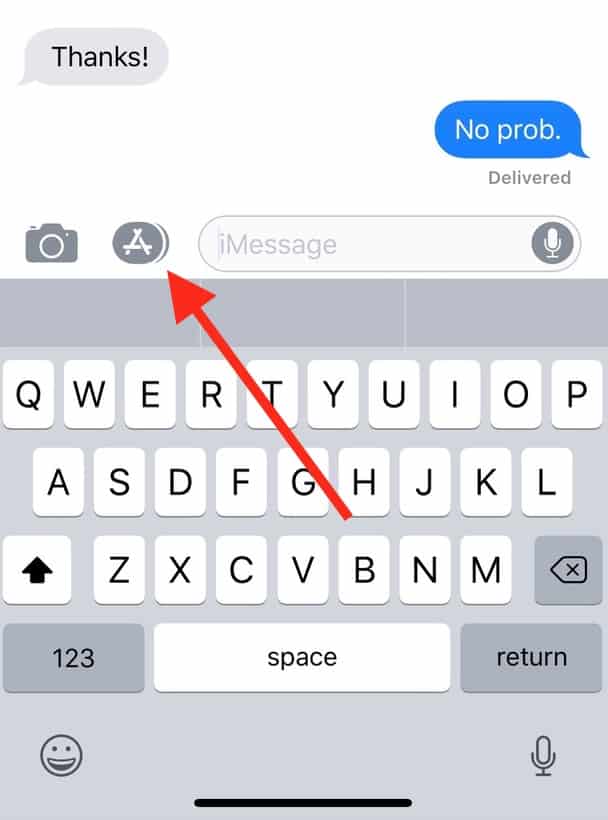
Then touch the screaming monkey at the bottom to open the Animoji panel.

To create an Animoji, select one of the creatures first from the left-hand panel, then press the big red button to record yourself talking or making faces for up to ten seconds. After you’re done, you can send what you’ve made to the person whose conversation you’re in by touching the blue arrow.

Now that the basics are out of the way, here’s one method for saving your creation. Just find it within the conversation after it’s sent, then press and hold on it briefly…

…to bring up the options below.

As you can see, “Save” is one of those choices, and if you select that, the Animoji will get added to your Photos app. Nifty! Now, to create a sticker instead, open the Animoji panel as I described above, make a face with whichever animal/robot/alien/poop thing you want, and then press and hold on the Animoji itself.

You can then drag it up to place it on any speech bubble to adorn it with your very own custom sticker.

This feature may not have a whole lot of real-world usefulness, however. Or maybe it’ll become the hot new way to quit your job, break up with your boyfriend…the mind boggles. Nothing says “mature adult” quite like a poop sticker, I think.


Hey Lee!
Yup, non–iPhone X iOS users can definitely view Animoji (as my now very annoyed pals can attest). It’s my understanding that other smartphone owners can too, as the shared Animoji are sent as video files.
Hope that helps!
Melissa
Thanks Melissa. They send me gibberish text abbreviations, I send them animoji ?
😀 😀 😀
Can non iPhone X users see the animated emojis, non iOS users for that matter?