
With features like noise gates, compressors, dual mic inputs, and multiple virtual USB audio devices, the Podcaster Pro aims to solve all the common (and some uncommon!) needs that podcasters have both in their main studios as well as on-the-road.

Dave Hamilton
Dave Hamilton co-founded both The Mac Observer and <a href="https://www.backbeatmedia.com" data-wpel-link="external" target="_blank">BackBeat Media</a>, and he is producer and co-host of the <a href="https://www.macgeekgab.com" data-wpel-link="external" target="_blank">Mac Geek Gab Podcast</a>. He has worked in the computer industry since the early 1990s, doing time as a consultant, trainer, network engineer, webmaster, and programmer. He has worked on the Mac, all the various Windows flavors, BeOS, a few brands of Unix, and it is rumored he once saw an OS/2 machine in action. Before that he ran some of the earliest Bulletin Board Systems, but most of the charges have since been dropped, and not even the FBI requests that he check in more than twice a year. Dave's reachable for paid consulting at <a href="https://www.davethenerd.com" data-wpel-link="external" target="_blank" rel="nofollow noopener noreferrer">DaveTheNerd.com</a> and you can find links to him on Twitter, Facebook, and Google+ here, too.
Articles by Dave Hamilton
Andy Grignon 10 Years Later, Reflecting on Helping to Create the iPhone
Skylar Hamilton*, writing for Mouth of the River, recently interviewed Andy Grignon, one of the original iPhone team members:
“It was terrifying to be honest! Remember we had spent years in solitude working on this thing under the strictest of Apple standards. Seeing it ‘out in the wild’ was surreal, to say the least,” says Grignon. Imagine hiding something so big for years and then the entire world not only knows about it, but they all use it. “After that feeling passed, it turned into sheer terror.”
*Yes, for those of you wondering, this is a “proud papa” moment for me, too. Forget that, though, and go read the interview. Some great stuff in there, including a tip about extending your battery life!

Sonos PLAYBASE Review: Room-Filling Sound for Music, TV, and Movies
The new Sonos Playbase falls right in line with what we Apple users have come to expect, delivering a simple-yet-robust experience for people who want to enhance the sound of their TVs and simultaneously add a whole-room music-listening solution. In one, low-profile box that sits underneath your TV (officially anything 75lbs or less), the Sonos Playbase gives you all of this and more, complete with easy setup and simple operation.
Fun with Mac Terminal’s ‘banner’ Command
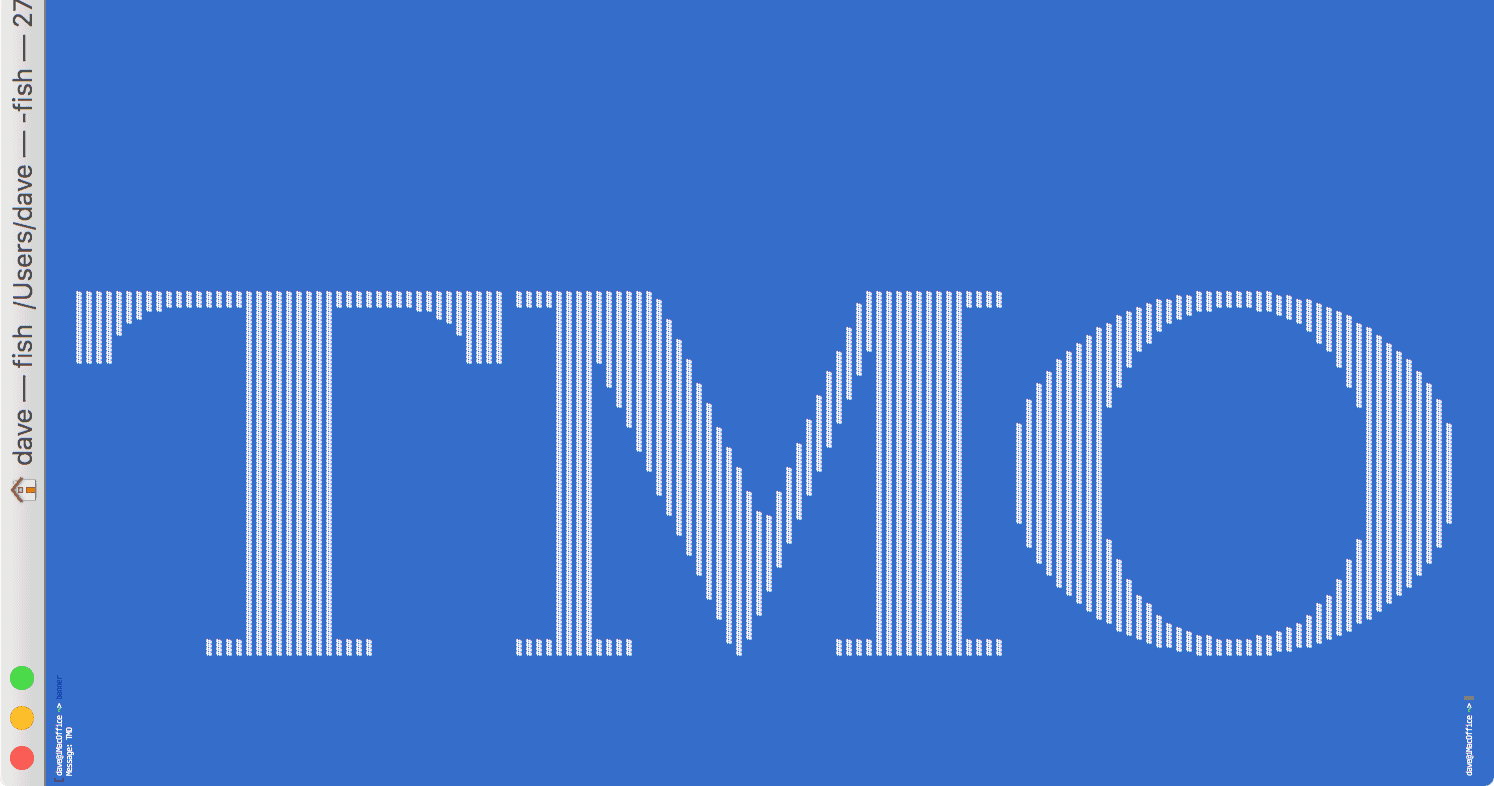
Mac Geek Gab listener Alex points us to a fun Mac Terminal command called “banner”, and its usage is simple. Launch Terminal, type ‘banner’, hit enter, type some text, hit enter again and voilà! You get a sideways banner of your chosen text fully suitable for printing on your favorite dot matrix printer.

Use the π Symbol on Your iPhone for Pi Day
Today is Pi Day. While some people might say that Tau is more relevant than Pi, it’s still Pi Day. With that in mind, you may want to wish your friends a happy Pi Day. And while that’s cool, it’s even cooler to wish them a Happy π Day (OK, well, it may or may not be cooler to do this, but it’s definitely geekier!). Unfortunately, we don’t have a π symbol in emoji on iOS. So in order to send that symbol you’ll either have to copy it from the text of this article and paste it in … or you can do what we did in the first place: add the Greek keyboard to your iPhone and type it from there!

Use a 4K Monitor in Retina Mode on Your Mac
In the old days when you purchased a monitor you had to decide between higher resolution and larger text. If your monitor’s native resolution was too high, you were plagued with either living with small text or running the screen at a lower resolution. People buying a 4K monitor today see the same issue, but there is an easy way to get that running in Retina mode. Apple’s solution to this issue was to introduce what they call “Retina displays” on Macs, and macOS allows you to achieve the same effect with your third-party, 4K monitor, as well. We’ll show you how.
Sonos Puts the PLAYBASE Under Your Television
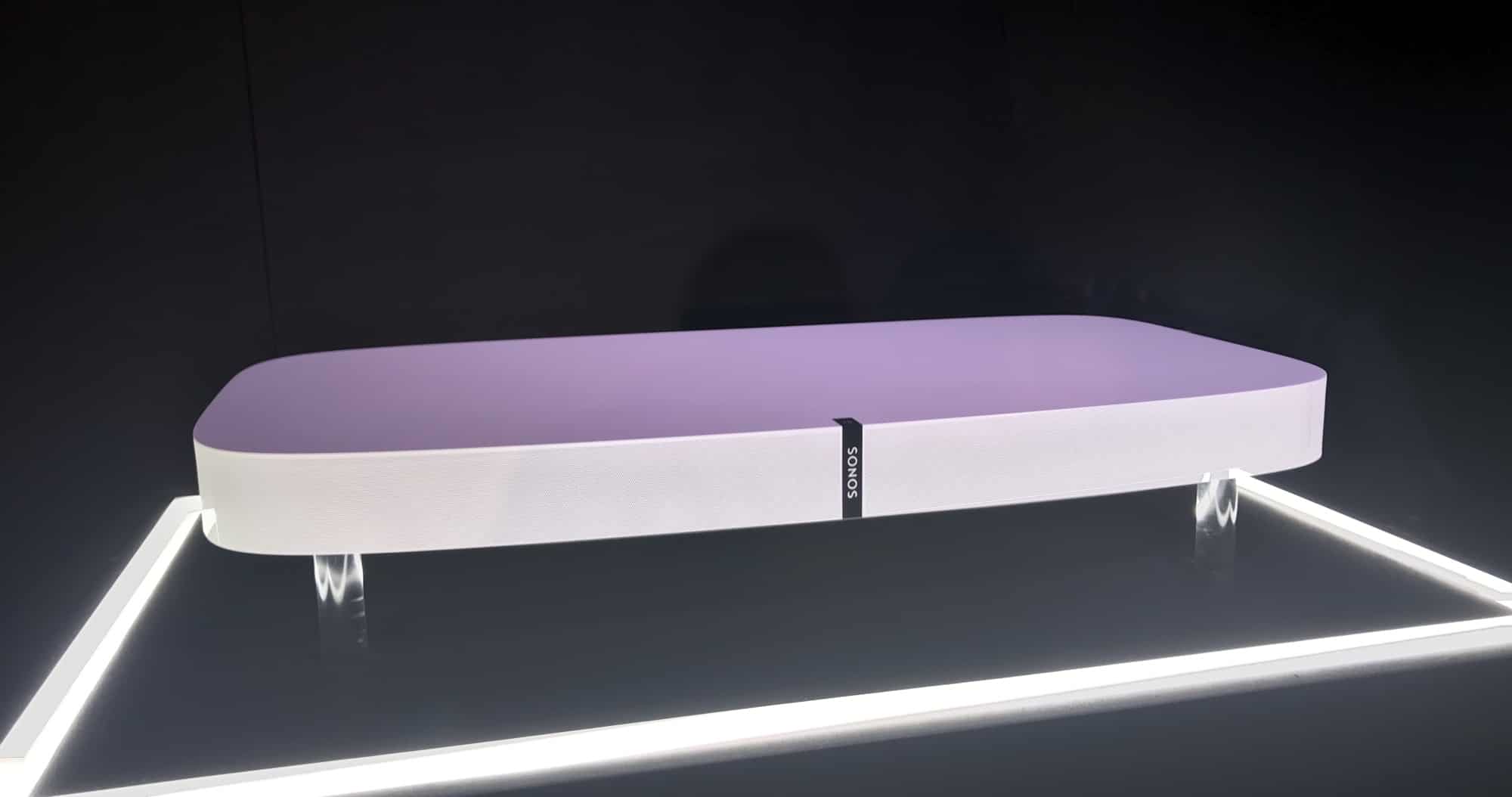
Today Sonos announced their new PLAYBASE, combining home theater sound and music playback in a low-profile base (just 2.28″ high!) that sits underneath your TV. The PLAYBASE is the result of nearly four years of iterative design work inside Sonos, and is made to complement the wall-mountable PLAYBAR in Sonos’ lineup. If your TV sits on a table, put a PLAYBASE under it; on the wall, put a PLAYBAR there. The PLAYBASE will hold TVs up to 77lbs, which should handle what most of you have.
While I haven’t yet tested the PLAYBASE in my home, I did get a chance to test it at Sonos’ offices last month, and the stereo spread and frequency response are impressive. They were able to fit a subwoofer in the thin design by use of a specially-engineered S-shaped port. It works, too, and really fills a room with sound for both music and video content. Of course, you’re able to use your iPhone or iPad to automatically tune the PLAYBASE to your room with Sonos’ Trueplay technology, ensuring the best possible sound for your environment. The PLAYBASE is priced at US$699 (same as the PLAYBAR), and will be released on April 4, 2017. Existing Sonos owners can pre-order starting today.
Video: A Look Around Inside CES Unveiled 2017
As a reader of TMO and a listener of our podcasts, especially Mac Geek Gab, you see and hear us write and talk a lot about the various press events we attend. Many of these – Pepcom, ShowStoppers, and CES Unveiled – are very similar in nature. They’re like a trade show, with a few key differences. First, every vendor has basically the same-sized table at which to present their offerings. There are no big booths and no overly-flashy signs or anything of the sort. Everyone’s logos are well-presented, but mostly its about the products. The reason for this is the second key differentiator: all of the attendees are members of the media. There are no distributors there, no general consumers looking around, no aimless tire-kickers. Everyone is there to report about what they see. And, as you know, that’s what we do. With one exceptIon: we’ve never reported about what we see in general. We always show you specific things, but have never intentionally given you a glimpse of the event itself. Here, today, we change that with a look around inside CES Unveiled 2017, just about 15 minutes after the doors opened. Oh, and yes, there’s food. Yummy, tasty food. Enjoy!
Belkin Announces Linksys Velop Mesh Wi-Fi System
Linksys, a brand known for some of the earliest wireless routers, today joins the the market of mesh Wi-Fi providers with their own mesh offering called Velop. Shown here at the CES 2017 Unveiled event, Belkin’s Linksys Velop is a welcome entrant to the home mesh wireless market with a unique tri-band solution that allows for completely dynamic assignment of each unit’s three 2×2 radios. Velop can work in point-to-point, mesh, star, line or tree configurations, choosing whichever is best or most-appropriate for the current wireless environment. Each radio in the system is automatically mapped to the best configuration, and Ethernet backhaul is automatically detected and supported, as well. In a market that’s becoming quite crowded, I find the Velop an interesting contender, combining some of the better aspects of both the eero and NETGEAR Orbi platforms, priced exactly the same as the eero. Units are available for pre-order today in three ($499), two ($349) and one-unit ($199) packages and will start shipping on January 15th. We’ll be getting units to test and will report back with our findings, adding them to our existing mesh Wi-Fi coverage.

For Geeks Only: Hey Alexa, Tell Sonos to Play Stevie Wonder in the Kitchen
Sonos and Amazon jointly announced their Alexa integration earlier this year and the world rejoiced. Voice control of your Sonos system is one of those holy grails. The integration is expected to be available at some point in 2017. But I’m an impatient geek so, while I’m waiting for official support to be available, I spent an hour yesterday getting this working using freely-available open-source tools. You can do this, too, and I’ll walk you through what you’re doing and how to get started.

Fake News and Snatched iPhones – TMO Daily Observations 2016-12-05
The UK police got unlocked access to a suspect’s iPhone but, unlike the FBI earlier this year, they didn’t have to ask Apple to hack it. Interestingly, though, the FBI did something very similar to the UK police a few years ago. Listen to hear more. Then it’s on to how Apple might just be our last hope to save the integrity of the internet. John Martellaro explains!
Uber Sees You When You're Sleeping…Around – TMO Daily Observations 2016-12-02
“I’ll be watching you” is a line that might make Sting look a lot more prescient after you hear this episode. Uber and Waze want to know where you are even more than they used to, and Apple wants to put drones in the air over your roads and in front of your homes, at least for a little bit. It’s a brave new world. Our advice: don’t go outside without pants on.
Apple's Tribes and Cloud Services – TMO Daily Observations 2016-12-01
There is a long history of tribes discussing, analyzing and, yes, chastising Apple. That’s more true today than it ever has been… or is it? How much of the past reflects in the future? Those very same tribes often talk about Apple’s need to increase the amount of free iCloud storage provided to each user. Are they right? Join TDO today as John Martellaro, Adam Christianson and Dave Hamilton discuss!
TMO Daily Observations 2016-11-30: Offline Netflix and AirPods Alternatives
Netflix is now beginning to allow offline viewing for some content and Tim Cook suggests that he anticipates AirPods will ship in the next few weeks. John Martellaro and Kelly Guimont join Dave Hamilton today to chat through all this… and more, including a few recommendations for AirPods alternatives that you can buy today.

Podcasters: How to Log Chapter Timestamps with Keyboard Maestro
Many podcasters – and especially podcast listeners – have come to appreciate having chapters in podcast episodes. Putting chapters into a show can be a real chore for podcasters, though, especially for a show that’s recorded live. For all the podcasts I host, I employ a few Keyboard Maestro macros that, used together, allow me to have an internal clock running that simply pastes the existing timestamp wherever my cursor is. Here’s how I do it… and a download link to the macros I’ve already created for you!

Mesh Deals for Black Friday through Cyber Monday: Sonos and eero
Seems that I’m a sucker for a well-made mesh network, likely because “well-made mesh” means “it’s simple and it works without you having to mess with it.” Or, said another way, “mesh not mess.” Ok, enough of that, on to the deals, shall we? These are from two companies that traditionally do not offer discounts, and they’re only good through Monday, so snap them up while you can.

Wi-Fi Mesh Systems Compared: eero, Orbi, AmpliFi
The future of home Wi-Fi is mesh networking, a new approach to consumer wireless networks that includes smart management and multiple radios designed to handle the load of today’s gadgets. If you’ve been fighting with range extenders and other solutions to broaden your Wi-Fi coverage and keep your streams alive, you can now stop all that silliness and blanket your home with Wi-Fi. The future is here, and that future is mesh networking.

TMO Daily Observations 2016-11-16: Why is $feature Missing from Apple TV?
Today it’s time to look at Apple TV and ask one tough question: why don’t we get $feature on Apple TV? Good thing we’re geeks and we understand variables, too, because for this episode $feature = array(“4K Output”,”Amazon Prime Video”,”Netflix Inside of TV App”); Listen and hear what John and Dave have to say about all this… then send us your feedback and let us know!

Apple’s HomeKit Security vs. ioT Botnets – There’s Only So Much Apple Can Do
The recent botnet attacks have called into question the security of all our various internet of Things (ioT) devices, and rightfully so. One of the regular chimes I hear in our Apple-centric universe is, “HomeKit is secure, it must be the answer.” Unfortunately, HomeKit is only built to secure HomeKit, not everything. More must be done.

The Benefits of a 32GB Mac For Average Users
I didn’t think the difference between 16GB and 32GB would matter for my every day use. Sure, I’m a geek, but I’m not involved in graphic design or video editing. In the course of a normal day I don’t really run any pro apps. When I upgraded my 2014 27″ Retina iMac from 16GB to 32GB a few months ago, however, I experienced a dramatic shift in my computing life. No longer was my Mac paging out to swap all the time, no longer were apps slow to launch, and no longer was I regularly pushing against the limits of my Mac’s RAM.
Apple Releases iOS 10.1.1 with fix for viewing Health data
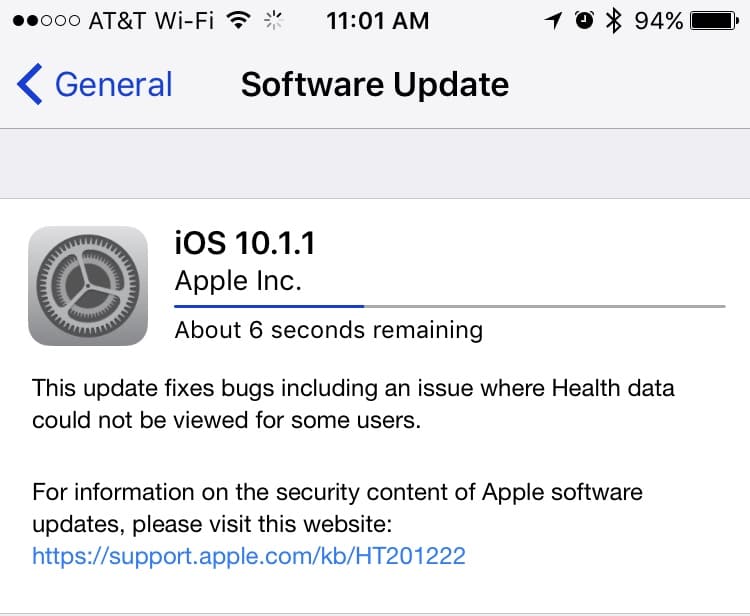
On Monday morning Apple pushed out iOS 10.1.1 via Software Update. The release notes are short and sweet:
This update fixes bugs including an issue where Health data could not be viewed for some users.
Check Settings > General > Software Update on your iPhone or iPad to download.

Existing Home Routers Could Be Used to Stop DDoS Botnet Attacks
There has been much written about how Friday’s DDoS attack was made possible by a security hole present in various internet of Things (ioT) devices. The lingering question is: how do we prevent this from happening again? The answer might be sitting right there in your home.

Phish's "Big Boat" Contains a Song Recorded Entirely on an iPhone
Today Phish released “Big Boat,” their 13th studio album, and it turns out one of the songs was recorded entirely on keyboardist Page McConnell’s iPhone. From Alan Paul, writing for the Wall Street Journal:
[Producer], Bob Ezrin gave the band members specific instructions: Learn and play 10 folk songs, then start writing, beginning with a folk song. Mr. McConnell’s effort, “Things People Do,” not only made the final cut, but the version included is his demo. Phish made multiple versions of the song before agreeing that nothing topped the original low-fi version, recorded on Mr. McConnell’s iPhone, sitting atop a Wurlitzer piano in his living room.
You can listen to “Big Boat” and, more specifically, “Things People Do” on Apple Music, of course.

iOS 10: Print to PDF With and Without 3D Touch
One of the new features in iOS is the ability to natively print to PDF, similar to what you can do with macOS. It’s relatively simple, but not necessarily obvious. It involves getting the print preview up on the screen, and then switching to share mode in order to generate a PDF. We’ll show you the steps!