
Don’t count on seeing Apple’s rumored unified app platform at Worldwide Developer Conference this year. That’s likely happening in 2019, and macOS will go 64-bit only at the same time.
iOS

How to Stop Video Autoplay in the iOS App Store
The iOS App Store on your iPad or iPhone may autoplay video demos of the apps you’re looking through; if you find that annoying (or don’t want such a thing eating up your cellular data!), come on in and learn what to do in today’s Quick Tip.
Apple Releases iOS 11.3.1: Includes Security Fixes and Addresses 3rd Party Screen Replacement Problem for iPhone 8
Apple’s patch notes specify two things: security and an issue affecting iPhone 8 devices with unauthorized third party screen replacements.
How to Block Memories in Photos
In both Photos on the Mac and on your iOS devices, you can actually block the types of memories you don’t want to see—holidays, for example, specific dates, or even a person. Getting those memories with bad associations out of your face is the subject of today’s Quick Tip!

Apple Says Switch to iPhone with 2 New Commercials: App Store and Portraits
They’re both part of Apple’s Switch to iPhone series, offering short metaphorical illustrations for why you should ditch other platforms for iPhone.

No Unified Apple OS for You, Daisy iPhone Recycling Robot - TMO Daily Observations 2018-04-20
Dave Hamilton and Andrew Orr join Jeff Gamet to talk about why macOS and iOS won’t merge into a single operating system for now, and they look at how the iPhone’s long life span stands in contrast to Greenpeace criticism.
How to Unsubscribe from Shared Photo Albums
Within Photos on the Mac and in the iOS app, there’s a way to unsubscribe to shared albums that you’re a part of. So if you no longer need to see twenty pictures a day of your third cousin’s new dachshund, you can opt out! We’ll tell you how, even though we’re not quite sure why you’d want to see fewer puppy pictures.
Quick Apple Video Tip on Managing Multiple Emails on iPad
Check out this video tip from Apple on working with multiple emails at a time on iPad. This is a new feature to me, and I bet for a lot of other people, too. The short version is that you can use the handle at the top of an email you’re writing to drag it down to the bottom of your screen, where it stays docked. That allows you to peruse your inbox. If you have just one docked email, tapping it brings it back up. If you have more than one, it gives you a Safari tab-like view to pick the one you want. It’s a nifty feature. Oh, and it works in portrait and landscape mode.

iOS: How to Download Netflix Shows for Offline Binging
Not all content is available for download though.

macOS High Sierra: How and Why to Set Up iCloud Content Caching (Update)
Apple recommends that you set up content caching on a Mac that has a wired Ethernet connection. You can do it over Wi-Fi, but performance may be affected.

Apple's 2019 Mac Pro Will Be Fundamentally Different
There is every indication that Apple’s 2019 Mac Pro will be fundamentally different than its predecessors. John explains.

Harry Potter: Hogwarts Mystery Launches April 25th with Dame Maggie Smith and Michael Gambon Voices
Harry Potter: Hogwarts Mystery is designed to allow players to create their own Hogwarts student and experience life at the wizarding school.

macOS and iOS: New Website Warnings (and What They Mean)
Today’s Quick Tip is on a fancy new security feature of the latest releases of macOS and iOS. It can protect you! But only if you pay attention to it. We’ll go over what it’s telling you and what you should do—or not do!—when you see it.

Two New Apple Videos for Working on iPad, Sock Puppets and Cherries Not Included
The first one shows you how to use two at once, while the second shows how to annotate and markup screenshots.

Hidden Code in iOS 11.3 Could Reference Apple AR Glasses
The CoreUI framework can now request UI assets in meters. Is that part of ARKit 1.5 or something else?

TMO Background Mode Interview with Tidbits Security Editor Rich Mogull
Rich Mogull has twenty years experience in information security, physical security, and risk management. He specializes in data security, application security, emerging security technologies, and security management. Prior to founding Securosis, Rich was a Research Vice President at Gartner on the security team where he also served as research co-chair for the Gartner Security Summit. Currently, he is the security editor at Tidbits. We chatted about Rich’s career, then delved into some security issues of interest to Apple customers: the relative security of macOS vs. Windows 10, the security of iOS, whether AES-256 encryption is still “good enough,” iCloud security, and the technical feasibility of an unhackable backdoor into our iPhones for law enforcement. If you’re interested in all things security, this is the show for you.

Apple Releases iOS 11.4 Developer Beta with AirPlay 2 Support
Apple released iOS 11.4 developer beta for the iPhone, iPad, and iPod touch on Monday. This is the first developer beta for iOS 11.4 and includes AirPlay 2, along with hints that HomePod stereo support is finally coming.
How to Sort iOS App Store Reviews
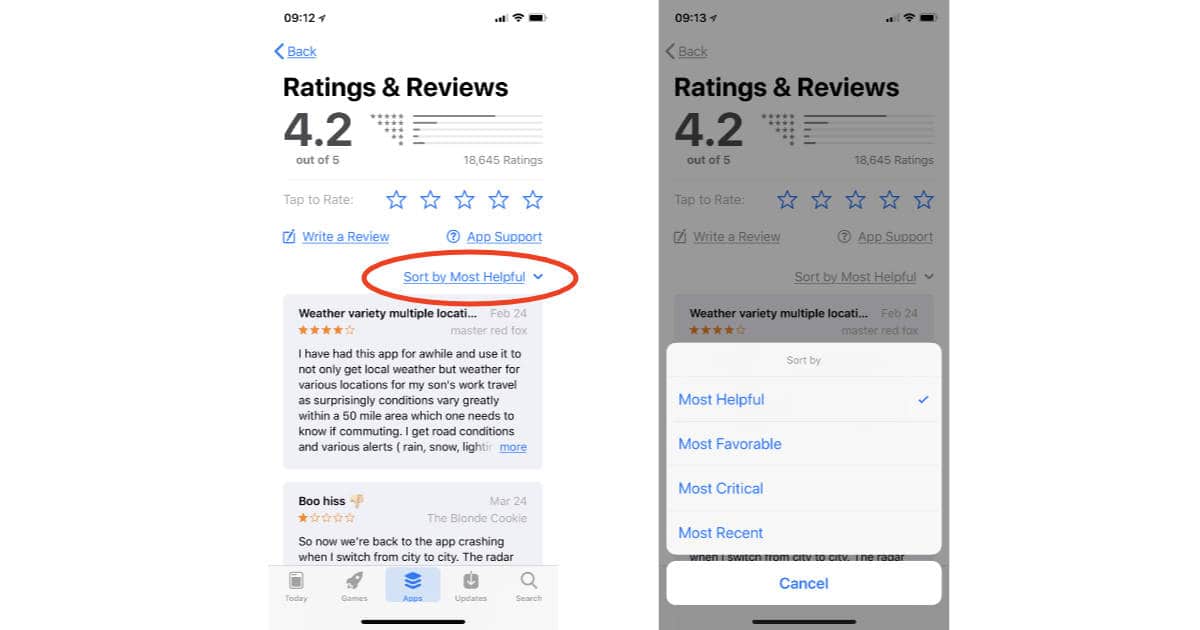
When Apple released iOS 11.3 last week some handy new features went relatively unnoticed, like the ability to sort App Store reviews. It’s a handy feature, and easy to use. Read on to learn how it works.

The iPad Paradox: Why it Can't Really Teach Kids to Code
Apple’s “Field Trip” education event produced a flood of excellent articles about Apple’s standing in the education market. Here are four of the best. And one hits a hot button.
Apple Profile Downloads, Business Chat Explained - TMO Daily Observations 2018-03-30
Andrew Orr and John Martellaro join Jeff Gamet to talk about Apple letting us download the data associated with our Apple ID, plus they take a look at Business Chat in Messages.
Apple Rolls Out First HomePod Software Update
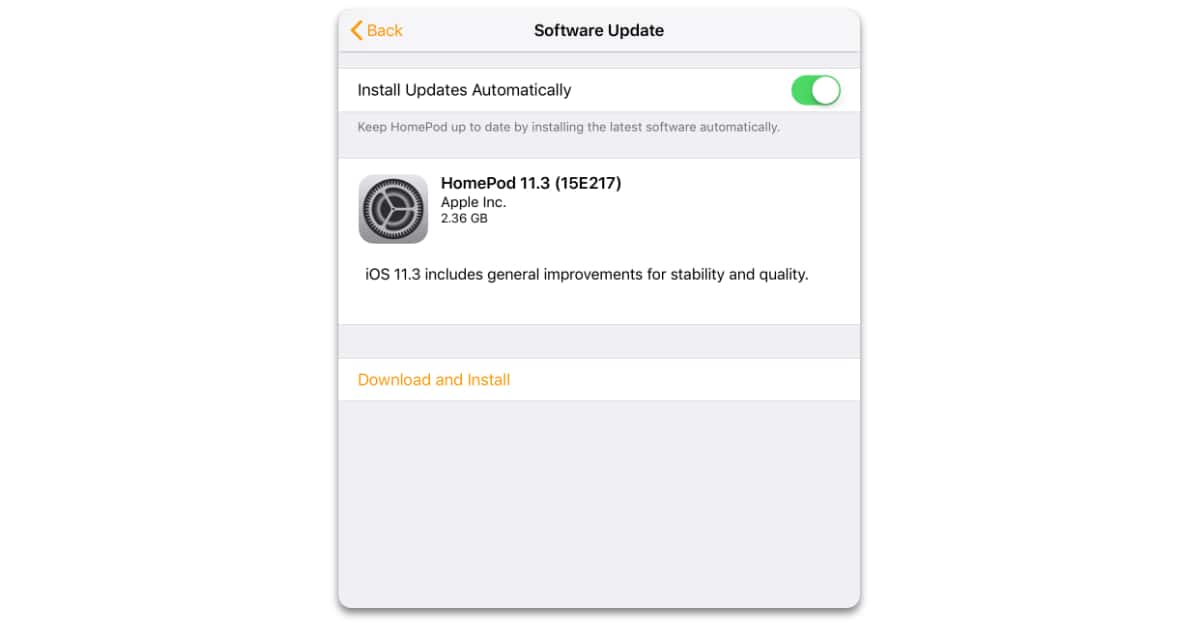
Along with iOS 11.3, Apple released the first HomePod software update on Thursday. The update, HomePod 11.3, includes what Apple calls “general improvements for stability and quality.”

Apple Releases iOS 11.3 with Battery Health Settings, New Animoji, More
Just a day after released a special version of iOS 11.3 for the 9.7-inch iPad with Apple Pencil support, Apple rolled out its general iOS 11.3 release for iPhone, iPad, and iPod touch.

Apple Releases iOS 11.3 for New iPad
There’s no indication of when the update will be available for other devices, but we don’t expect it to be much longer.
Apple Quietly Changed the Icon for the iOS Pages App
The Pages icon on the Mac remains the same though, although maybe it will get updated in the next version of macOS.