
On Thursday MacPaw announced a redesign of its CleanMyMac X app as well as native support for Apple’s new M1 Macs.
Mac
The Mac – or “Macintosh” if we’re going back to 1984 – is the first computer to effectively market a graphical computer to the masses, all delivered by Apple (or, at the time, Apple Computer).
The Mac has gone through several stages of evolution and iteration since 1984, including the MacBook Air, MacBook Pro, Mac mini, iMac, iMac Pro, Mac Pro, Performa, Power Mac (including the G4 Cube!), iBook, and more. It remains one of the most popular computers you’ll see in business, schools, and homes today.

Amazon’s Mac Cloud Supports macOS Big Sur on EC2
Amazon announced on Wednesday that customers of its Mac-in-the-cloud service can start running macOS Big Sur images on EC2 instances.

Firefox 86 Introduces ‘Total Cookie Protection’ Privacy Feature
Firefox 86, introduced recently by Mozilla, adds a new privacy feature called Total Cookie Protection.
Total Cookie Protection works by maintaining a separate “cookie jar” for each website you visit. Any time a website, or third-party content embedded in a website, deposits a cookie in your browser, that cookie is confined to the cookie jar assigned to that website, such that it is not allowed to be shared with any other website.

How to Find Out if Your Mac has ‘Silver Sparrow’ Malware
Right now we know that Malwarebytes can detect it, and other anti-malware vendors will likely be updated soon.

Mysterious ‘Silver Sparrow’ Malware Confuses Researchers
Over the weekend we got news of a mysterious piece of malware called Silver Sparrow. It has infected 30,000 machines so far and there is a version of it built for M1 Macs. But security researchers can’t figure out its purpose.
Once an hour, infected Macs check a control server to see if there are any new commands the malware should run or binaries to execute. So far, however, researchers have yet to observe delivery of any payload on any of the infected 30,000 machines, leaving the malware’s ultimate goal unknown. The lack of a final payload suggests that the malware may spring into action once an unknown condition is met.

The 2021 Apple Platform Security Guide is Here
Apple regularly shares security guides for each of its systems, and today it shared its 2021 Platform Security guide for all of its systems.

Chrome OS Passes macOS to Become Second Most Popular Desktop OS
New data shows that Chrome OS has overtaken macOS to become the second most popular desktop OS. Chrome OS rose from 6.4% in 2019 to 10.8% in 2020.
Despite the fact that macOS landed in third, viewing this as an example of Google beating out Apple directly might not be accurate. Rather, it’s likely that Chrome OS has been primarily pulling sales and market share away from Windows at the low end of the market. Mac market share actually grew from 6.7 percent in 2019 to 7.5 percent in 2020.

Safari Adware ‘GoSearch22’ Targets M1 Macs
Security researcher Patrick Wardle found a Safari adware extension called GoSearch22 has been rewritten to target M1 Macs.

The World of Apple Leaks and Measuring Apple's Success, with Ken Ray - ACM 543
Bryan Chaffin and Mac OS Ken (Ken Ray) discuss the really weird world of Apple leaks and rumors, including how to navigate them and how they try to cover them as journalists. They also talk about how to measure Apple’s success, or more specifically, how a lot of folks outside the Apple world seem to measure Apple’s success.

Apple Issues Security Update to Fix ‘Baron Samedit’ Sudo Bug
Apple has issued security updates for multiple version of macOS on Wednesday. Among other flaws, it fixes the sudo flaw known as Baron Samedit.

AirBuddy 2 - Connect AirPods to Your Mac with One Click: $8.99
We have a deal on AirBuddy 2, a Mac utility that lets you connect your AirPods to your Mac with a single click. With AirBuddy, you can also open your AirPods case next to your Mac and see the current status right away, just like it works on your iPhone or iPad. It’s $8.99 through our deal.

Homebrew M1 Support Announced in Version 3.0.0
Homebrew announced a new 3.0.0 of the package manager on Friday. Its most significant change adds support for M1 Macs.

Review: Satechi Slim X3 Bluetooth Backlit Keyboard
Satechi sent Andrew its Slim X3 Backlit Bluetooth Keyboard. He shares his thoughts on this product that launched in January.

Cloud Provider ‘Scaleway’ Launches Apple M1 SaaS in Europe
Cloud provider Scaleway announced the launch of a software-as-a-service offering based on Apple’s M1 chip.

Apple Releases macOS Big Sur 11.2, Fixing Bluetooth Reliability and Other Issues
Apple has released macOS Big Sur 11.2, and the latest version of the Mac operating system includes a number of bug fixes.

Apple has Released macOS Big Sur 11.2 RC 3 to Testers
Apple has released the third Release Candidate (RC) for macOS Big Sur 11.2 for developers and public beta testers.

Password Manager Bitwarden Adds Touch ID to Browser Extension
Password manager Bitwarden announced the addition of a couple of new features. One feature adds support for Touch ID and Windows Hello to its browser extensions.
Browser extensions will now be able to access this authentication inside the Desktop application. This allows a more streamlined integration with hardware that does not require a unique browser-level integration. Biometric authentication requires macOS users to download the Mac App Store version.

Buffer Overflow Bug Found in SUDO Dubbed ‘Baron Samedit’
Tracked as CVE-2021-3156, a heap overflow bug found in sudo and dubbed “Baron Samedit” has been found recently. It allows an unprivileged user to gain root privileges on a vulnerable machine using a default sudo configuration.
The vulnerability itself has been hiding in plain sight for nearly 10 years. It was introduced in July 2011 (commit 8255ed69) and affects all legacy versions from 1.8.2 to 1.8.31p2 and all stable versions from 1.9.0 to 1.9.5p1 in their default configuration.
2020-02-03: Looks like macOS is affected after all.
Apple Releases macOS Big Sur 11.2 Release Candidate
Apple has released the macOS Big Sur 11.2 release candidate for developers. This follows the other final beta versions of its other operating systems.
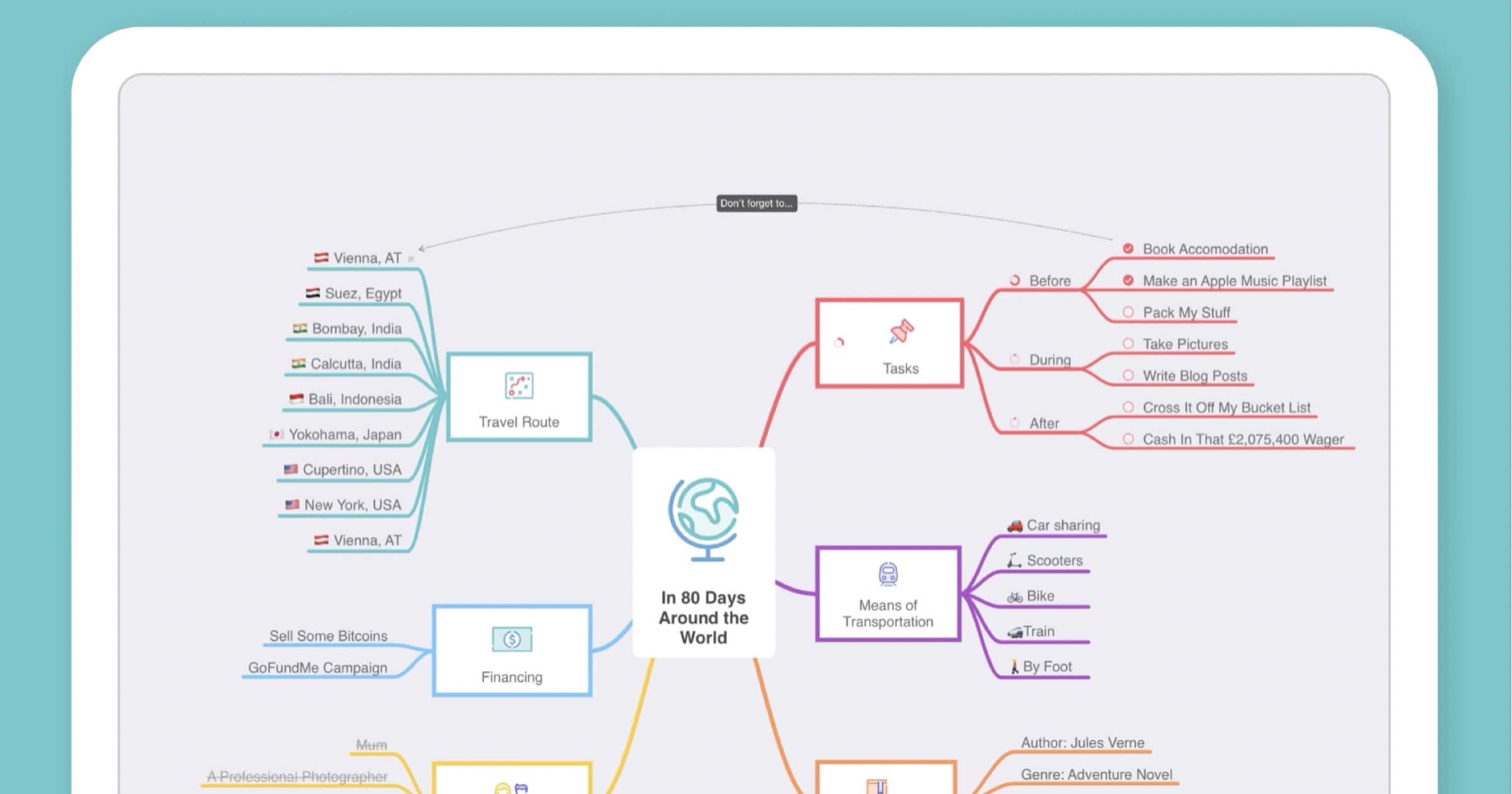
MindNode Update Adds Editable Outlines
MindNode updated its mind mapping app recently with a feature many users have wanted. Along with editing maps, outlines can also be edited. Nodes can be added, removed, indented/outdented, and reorganized directly. Other features include: Improved color pickers in the Inspector; Improved support for files from other apps that use Markdown; Fixed an issue where the Inspector would close when the icon of the open section was clicked. The update is currently available for the Mac app, but updates to MindNode for iOS/iPadOS are sure to follow.

Twelve South’s New ParcSlope Stand Works for Mac and iPad
Twelve South introduced a new stand called ParcSlope that works with MacBooks and iPads. It‘s available to purchase for US$59.99.

Media Player ‘VLC’ Adds Support for M1 Macs
Open source media player VLC has added support for M1 Macs in its latest update, version 3.0.12.1. You can find the download here.
macOS: * 3.0.12.1 is the first release for Apple Silicon macs
* Version bump to allow an automatic upgrade path

Microsoft Edge Beta Now Supports Apple M1 Macs
Apple users with an M1 Mac who are interested in running beta versions of Microsoft Edge can now do so thanks to recent support.

Rumor: Apple Prepares MacBook Pros With MagSafe, Flat Design
A report on Friday claims that Apple is working on upgraded MacBooks for later in 2021 with the addition of MagSafe and removal of Touch Bar.