![Report: 3% of Super Mario Run Users Paid to Unlock the Game [Updated]](https://www.macobserver.com/wp-content/uploads/2017/01/super-mario-run-purchase.webp)
Many hoped that Nintendo’s single in-app purchase approach for Super Mario Run would save us from the microtransaction free-to-play hell that is the iOS App Store. And while heavy marketing from Apple and the Nintendo brand gave it a boost, in the end only about 3% of users are estimated to have paid.
iOS

My 3 Favorite iOS Apps From 2016
As 2016 comes to an end, it’s nice to look back and reflect upon the year. I’d like to share my three favorite apps that I’ve used this year, and why I liked them: Cryptomator, RNI Flashback, and Curiosity.

iOS 10: How to Prioritize Downloads
If you’ve ever been stuck waiting for an important app to download when you’re doing a bunch at once, then you need to know about iOS 10’s “Prioritize Download” feature. It’ll let you tell your iPhone or iPad to push the one you need to the front of the line, pronto!

How to Transfer Files Between Mac and iPhone With iTunes
There are multiple ways to share files between Apple devices. You can use AirDrop, iMessage or even email. But an oft-overlooked feature is iTunes File Transfer. Andrew Orr explains how to use this feature to transfer files between your iPhone and Mac.

iOS Developers Get More Time To Use ATS
At its World Wide Developers Conference (WWDC) this year, Apple announced that all apps on its platform must support App Transport Security (ATS). The company told developers on Friday, however, that it is extending that deadline.

Russia And Turkey Ask Apple to Unlock Killer's iPhone 4s
Apple’s encryption debate isn’t over yet. Several days ago, a man assassinated the Russian ambassador to Turkey before turning the gun on himself. Now, Russian and Turkish authorities have asked Apple to unlock the shooter’s iPhone 4s.
Apple Stopped Signing iOS 10.1 and 10.1.1 - What That Means
Now that iOS 10.2 is officially released to the public, Apple has stopped signing iOS 10.1 and iOS 10.1.1. Users won’t be able to downgrade if you run into issues with iOS 10.2. Andrew Orr explains what that means.
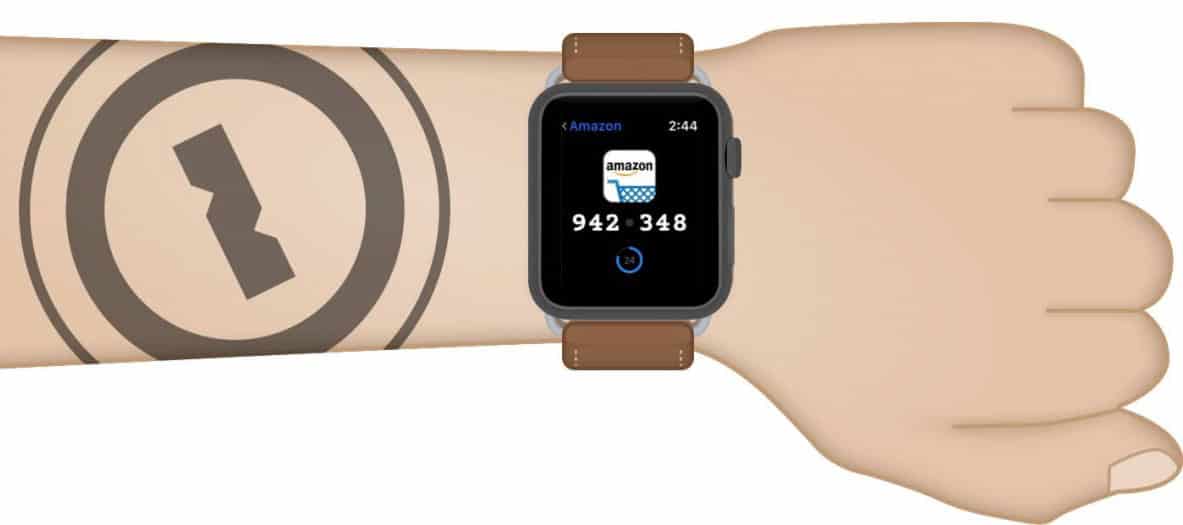
1Password 6.5 for iOS Adds Native Apple Watch App
AgileBits announced Tuesday the release of 1Password 6.5 for iOS. This release offers device syncing through 1Password.com and gets the iOS version up to date with 1Password 6.5 for Mac. The company also made the Apple Watch app native, which should mean it will be much faster (you can read more about that in the AgileBits blog). In addition to being faster, the native app allows you to access entries to any vault, including vaults stored in 1Password.com—previously, you could only access items in your primary vault. You can download the update through the App Store.

macOS Sierra: Sharing Apple Notes
One of the updates that macOS Sierra brings to the table is collaboration, specifically in Apple Notes. Sharing notes is a great way to collaborate with your friends, family or coworkers.

Here Are the 104 New Emojis in iOS 10.2
Yesterday Apple released the long-awaited update to iPhone: iOS 10.2. With this version, iPhone users can make use of 104 new emojis. There’s nothing specifically telling you which ones are new, however, so we gathered them together for you.

Apple Squashes 11 Security Holes in iOS 10.2
Apple released iOS 10.2 on Monday, and the company was much quicker than normal in releasing the security patch notes for the release. According to those notes, there are 11 security holes fixed in the release. Most of those holes are serious, and some allowed access to various aspects of a device when it should be locked.
Apple Ships iOS 10.2 with TV App, New Emojis, and Music Star Ratings
Apple shipped iOS 10.2 on Monday. The update includes a long list of improvements and changes, including the new TV app. That app gives iPhone and iPad users unified access to their movies and TV shows in line with the app of the same name on tvOS for Apple TV. Apple also emphasized redesigned emoji and the addition of 100 new one. Bryan Chaffin’s favorite feature, though, is the return of Star Ratings to Music.

Apple Watch: Editing Your Workout Screen
Today’s Quick Tip is about working out with your Apple Watch. You can make your workout view look any way you’d like, so whether you’re a statistics person or a “one thing at a time” type, you’ll get what you want. We’ll also show you how to customize each kind of workout!

Netflix Finally Introduces Offline Viewing for iOS & Android
Want to binge on your favorite Netflix shows but can’t spare the mobile bandwidth? Netflix today finally introduced offline viewing for iOS and Android, letting users download select TV shows and movies for viewing anywhere, regardless of connectivity.
iOS 10 Mail: New "Organize by Thread" Options
If you like organizing the emails on your iPad or iPhone by thread, then iOS 10’s got a couple of handy new choices for you. In this Quick Tip, we’ll go over them (and we’ll also cover what threading looks like if you’re unfamiliar with it!).
iOS and watchOS: Seeing Historical Heart Rate Data
Today’s Quick Tip is all about using the iPhone’s Health app to view collected heart rate data from your Apple Watch. If you’ve never looked through that info, then boy, are you gonna be surprised at how much you can see! It’s a little nuts, to be honest.
iOS 10: Deleting Previous Handwritten Messages
If you haven’t tried out iOS 10’s new handwriting mode in Messages, you’re gonna want to check out today’s Quick Tip. We’ll cover not only how to use this feature but how to erase the (potentially embarrassing) things you’ve drawn!

iOS: Shake to Undo on iPhone and iPad, and How to Turn it Off
Did you know you can shake your iPhone to undo many of your most-recent tasks? The reality is that many of us do know this, but everyone I’ve talked to—including me—forgets it. Some people will find it handy, though, so let’s take a look at it. For those who don’t like it, Bryan Chaffin will show you how to turn it off.
iOS 10 Maps: Adding Pit Stops Along Your Route
Today’s Quick Tip is about how to use the redesigned Maps app to get directions along your route, so you can stop at a gas station or grab coffee when you’re already navigating somewhere. This feature will even help you figure out how much time making a pit stop will add to your trip, so come find out how to use it!

How to Turn Off Music Auto-Shuffle in iOS 10
Did the Music app in iOS 10 start auto-shuffling your albums? It’s easy to fix, but you have to know where to look. Bryan Chaffin walks you through it.

iOS 10.2: How to Disable Always On Live Photo
If the iOS 10.2 beta is any indication, Apple thinks every iPhone pic we take should be a Live Photo. Live Photo is on by default and reactivates itself every time you launch the Camera app, but there is a way to force it to stay off. Read on to learn how.

Mute/Unmute Apple Watch Activity Reminders in watchOS 3
Apple Watch Activity Reminders are great, but sometimes you just need to mute them—or to unmute them. That setting is hidden in the Watch app in iOS 10, and Bryan Chaffin shows you how to use it.

Customizing Apple Watch Faces on Your iPhone
Today’s Quick Tip is all about using the Apple Watch app on the iPhone to customize your faces. If you don’t wanna fiddle with colors and complications on your itty bitty Watch, there’s now an easier, faster way to do so!