
Jeff Butts examines the Mac trackpad gestures available within macOS Sierra, explaining how to enable and use them.
MacBook Pro
Latest news, tips, reviews, and rumors about all things MacBook Pro.

New Macs at WWDC, Apple vs Diabetes, Lattice Data - ACM 411
This could be the year Apple breaks form and introduces new hardware at WWDC, and Bryan and Jeff explain why. They also discuss Apple’s big bets on an even bigger future and the importance of AI, neural nets, and machine learning.

Imagine What Mac Sales Would Do If Apple Did Something Crazy Like Update All the Macs
During the second quarter of 2017, Apple saw Mac unit sales increase by a modest four percent. Jeff Butts, ever the dreamer, imagines what would happen if Apple gave us new Macs across all the various form factor categories, from the Mac Mini to the Mac Pro.

Pop Goes the Laptop: Some New MacBook Pros are Making Unexplained Clicking Sounds
Your new MacBook Pro may be making a popping sound, but Apple doesn’t have anything to say about it. Many MacBook Pro users are complaining about what sound like random trackpad click noises coming from their laptop and so far Apple has been silent about the issue.

Freshen Up Your Older Mac and Make It Feel New
When a new version of macOS comes out, many people are tempted to get the latest and greatest Mac to go with it. You don’t have to do that in most cases, though. Jeff Butts shows us how a few timely upgrades can make an older Mac feel like new again.

Apple Remote Desktop Updated with Touch Bar Support
Apple updated Apple Remote Desktop to version 3.9 Tuesday. The update adds support for the Mac Book Pro’s Touch Bar. It also features the ability to export computer lists and beefs up security.

Apple, Kill the LG UltraFine 5K and Make Your Own Displays
As if it weren’t bad enough that the LG UltraFine 5K performed poorly when placed too close to a wireless router, now Apple’s shipping times for the display have slid to five to six weeks. Jeff thinks that it just might be time for Cupertino to resume making the displays for their Macs and MacBook Pros instead of relying on the third-party market to fill the void.
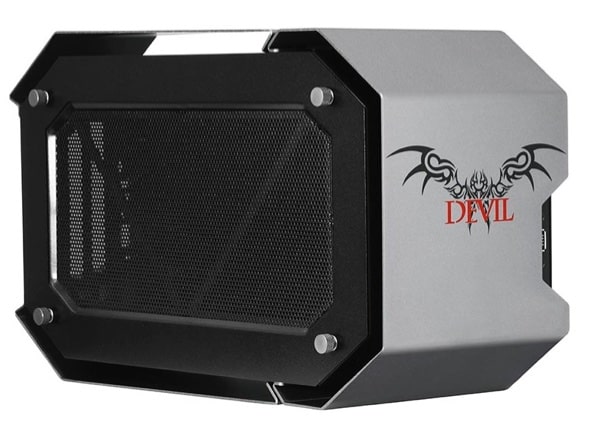
The Devil Box Enables Solid Thunderbolt 3 Graphics Expansion
The promise of Thunderbolt has always been to eliminate the need for internal expansion slots. But it wasn’t until Thunderbolt 3 and its 40 Gbps speed that having a second, external, high end graphics card would become a practical reality. For example, if you’d like to augment your new 2016 MacBook Pro with a Radeon RX400 series or an Nvidia Geforce GTX 10, now you can do that with this $379 TB3 expansion box from PowerColor called the Devil Box. Here’s a review to whet your appetite for some serious graphics power.

Listener Comments on Consumer Reports, Apple Music Goes Pop Culture - TMO Daily Observations 2017-01-16
TDO listeners have plenty to say about how Consumer Reports rates laptops, so today dive into their comments. Bryan Chaffin and John Martellaro join Jeff Gamet to respond to listener comments, plus they share their thoughts on Apple Music becoming a pop culture nexus.
Consumer Reports Loves the Mac Again, Bigger Apple TV Apps - TMO Daily Observations 2017-01-13
Consumer Reports changed its tune and now recommends Apple’s new Touch Bar MacBook Pro. John Martellaro joins Jeff Gamet to debate whether or not we should trust Consumer Reports computer reviews, plus they share their thoughts on the big app size increase for Apple TV.

Jeff's 4 Must-have Touch Bar MacBook Pro Adapters
After spending a month with Apple’s 15-inch Touch Bar MacBook Pro I’ve found there are only four must-have Thunderbolt 3 adapters I need to attach everything I use with my computer. I don’t need all of them all the time, but they’re my go-to set for all of my wired connection needs.

Apple Finds Bug after Consumer Reports MacBook Pro Battery Test
Consumer Reports said in a blog post Tuesday that Apple has a fix for a bug uncovered in CR testing. According to statements from both CR and Apple, there was a bug in Safari that caused battery life issues on Apple’s new MacBook Pro with Touch Bar, and Apple has released a fix for that bug to its beta program, and said it will release it to the public in the coming weeks.
Elgato's Thunderbolt 3 Dock Close Up at CES 2017
LAS VEGAS – Elgato’s new Thunderbolt 3 dock loads up your Touch Bar MacBook Pro with all the ports you need. Tim Böth highlights the features for Jeff Gamet at CES 2017.

How to Connect Your 2016 MacBook Pro to a mini DisplayPort Monitor
Want to connect your old Apple Cinema Display or another mini DisplayPort monitor to your new 2016 MacBook Pro? It’s possible, but not via the method you might think. Before you rush to pick up an adapter, be sure to check out these compatibility restrictions.

Speck's Presidio CLEAR for MacBook Pro Has 4-Feet Drop Protection
LAS VEGAS – Speck announced a new case for MacBook Pro (13-inch) that features 4-feet drop protection. Considering the lack of a MagSafe connector for charging on Apple’s new MacBook Pro models, drop protection may be on the minds of lots of folks. Speck said the case is made from its Impactium Clear material originally used for iPhone cases. As the name suggests, Presidio CLEAR is see-through, and it has a “no-slip grip” feel to it. It ships in later in the first quarter of 2017 and is priced at US$99.95—it hasn’t yet been added to the Speck website. I’ve never been a fan of cases on MacBooks, but drop protection? Come on, that’s cool.

The OWC DEC Promises to Make Your MacBook "Pro" Again
Do you find the 2016 MacBook Pro’s lack of ports a bit limiting? OWC may have the solution for you with the DEC, an upcoming accessory that attaches flush to the bottom of your MacBook Pro and adds external storage and a full array of ports including USB Type A, SD Card, and Ethernet.

Apple Trying to Beef Up Battery Engineering Team
In the wake of ongoing complaints about battery performance and reporting on MacBook Pro with Touch Bar, Apple is looking to beef up its battery-engineering team. 9to5Mac noted the company just added two positions related to batteries, Battery Algorithm Analysis Engineer and System Power and Control Architect.

Apple's TV App Reveals its Plight with Television Industry
From time to time, we’ve seem articles that explain Apple’s plight with its TV business. But John has found a splendidly complete diagnosis at The Verge for this week’s focus. It examines the deepest motivations of Apple, it’s clash with the entertainment industry, its successes and failures, and how that has, in turn, affected Apple TV software design and customer perceptions.
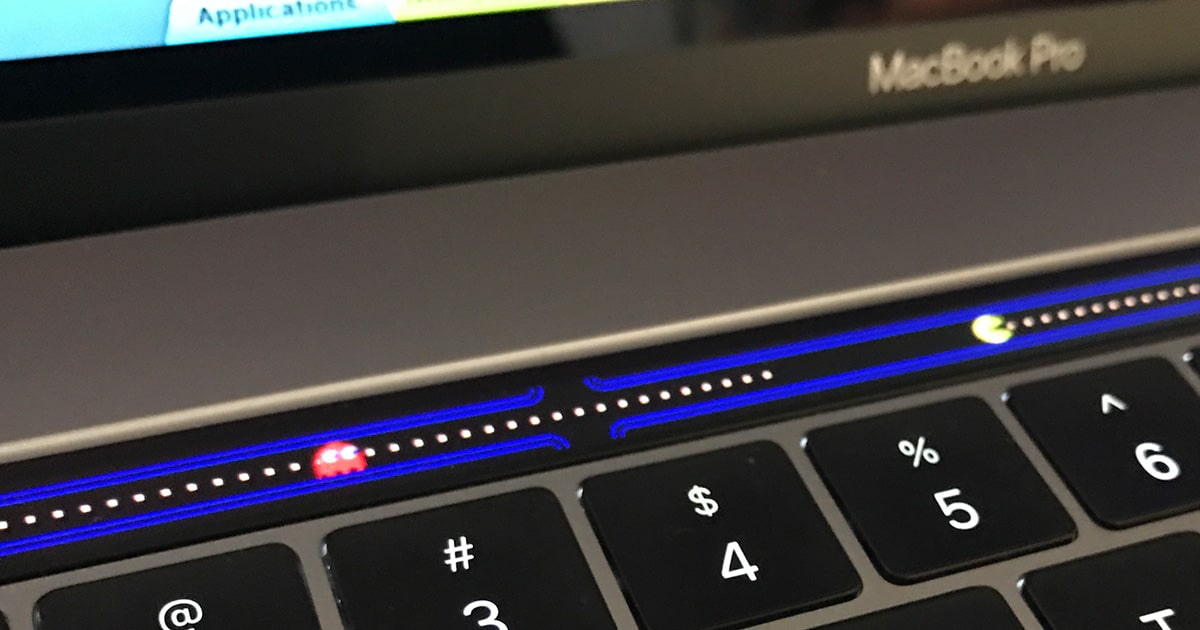
Play Pac-Man on your MacBook Pro Touch Bar
The Touch Bar on the new MacBook Pro may be functional, but it can be fun, too. Henry Franks makes that point perfectly with his Pac-Man clone, called Pac-Bar, for the Touch Bar. It’s just like the classic arcade game, complete with Pac-Man and his “wokka-wokka” munching sound, ghosts, and music. The maze is a little limited since you can only go left or right, although the intersections do jump you to either end of the Touch Bar. You’ll need to use your MacBook Pro’s arrow keys to play—sorry, no touch controls here. Click the Clone or download button on Henry’s Github page get Pac-Bar.
Turn Your MacBook Pro Touch Bar into a Piano
Turning your new MacBook Pro’s Touch Bar into a piano may not be practical but it is pretty cool, and that’s exactly what Touch Bar Piano does. The app lets you choose between 128 different instruments, and you can play chords, too. Touch Bar Piano is a free download, and while it isn’t the same as using an actual piano, it’s a cool example of the creative ideas developers are finding for the Touch Bar.

Plugable Claims New MacBook Pro Doesn't Recognize Some Thunderbolt 3 Docks
Device maker Plugable said Thursday that Apple’s new MacBook Pro with Touch Bar is incompatible with Thunderbolt 3 docks that use a particular Texas Instrument chip. If accurate, it means at least some early Thunderbolt 3 docks already on the market will not work with Apple’s newest Mac laptop.

Function Key MacBook Pro Teardown Shows Smaller Battery, Removable SSD
It doesn’t take long after a new Apple product launch for iFixit to strip it down to its frame, and that’s exactly what happened with the late 2016 Retina MacBook Pro with function keys. Inside they found a smaller battery, removable custom SSD, and more.

How to Re-enable the Startup Chime on Late 2016 MacBook Pro Models
The new 15-inch and 13-inch Touch Bar Retina MacBook Pro, along with their 13-inch function key sibling, do away with the Mac startup chime. Turns out the chime isn’t gone, but is only disabled—and it’s easy to re-enable with a quick trip to the Terminal. Read on to learn how.

Apple Kills Start Up Chime in New MacBook Pro Models
Apple has been on a killing spree of sorts with its new MacBook Pro models. The physical Escape key and function keys are gone, the traditional USB A and mini DisplayPort/Thunderbolt 2 ports are gone, the SD Card slot and MagSafe are gone, and the iconic startup chime is missing, too. It’s sad to see—or hear—the startup chime go, but it seems Apple has a reason for axing the sound.